Your Firewall Says “Active.” But It Might Be Doing Nothing
Your Firewall Says “Active.” But It Might Be Doing Nothing A firewall is more like a security desk at the entrance of…
Read
Choosing a web application firewall isn’t just about defending against attacks; it’s about deciding where to protect your applications and how that choice affects performance, scalability, and operations. When considering WAFs for a production load, you have probably reduced the list to the edge-native Cloudflare WAF and the regional, VNet-based WAF of Azure Application Gateway. Although the two can defend against SQL injection, XSS, and other OWASP threats, their architecture is completely different.
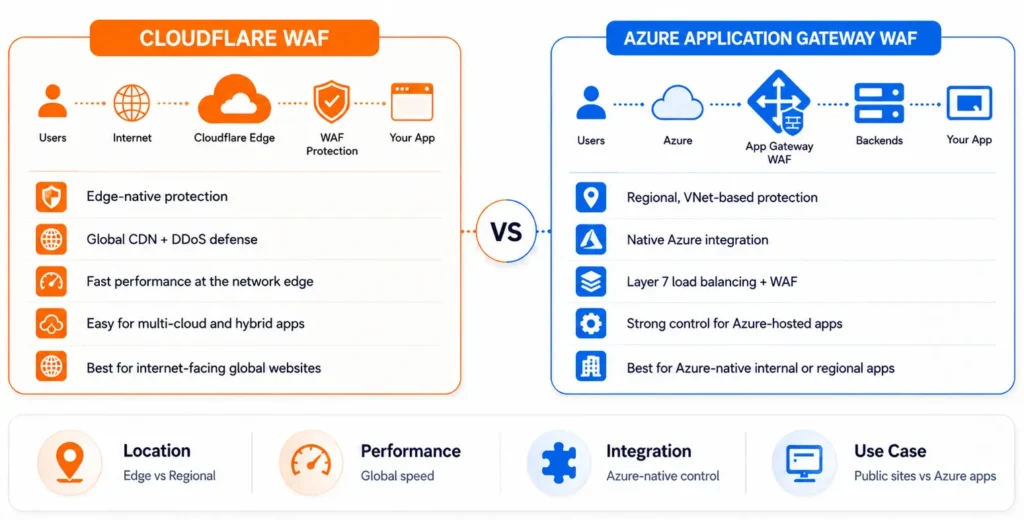
This guide discusses the aspects of Cloudflare WAF vs Azure Application Gateway WAF to assist architects and platform teams in making the best decisions about the WAF.
Cloudflare WAF is located at the border of Cloudflare Anycast. Traffic is served by the closest Cloudflare point of presence, (300+ locations around the globe), before it ever reaches your origin, wherever that origin is hosted (AWS, Azure, GCP, on-prem, a colo in your basement). Cloudflare does not know what is behind it. This renders it cloud-agnostic.
Azure Application Gateway WAF is a local service that resides within your Azure Virtual Network. It is a Layer 7 load balancer that has a WAF capability added as a bolt-on (WAF_v2 SKU) that is implemented into a particular Region and subnet of Azure. It is constructed to be used with traffic that is already redirected to Azure-hosted applications, and it is tightly connected with Azure-native resources like VNets, NSGs, Azure Monitor, Private Link, etc.
In the debate of Cloudflare WAF vs Azure WAF, the former scans and blocks traffic before incurring any of your cloud costs or computing power, and the latter filters traffic once it is within your Azure network perimeter, so volumetric attacks still get to the edge of your subscription before Azure network-layer defenses (Azure DDoS Protection) can kick in.
Both solutions may look similar at first glance, but their design reveals a different angle. The table below summarizes the most important changes that impact performance, scalability, and deployment decisions.
| Aspects | Cloudflare WAF | Azure Application Gateway WAF |
| Where it runs | Protects applications from Cloudflare’s global edge network before traffic reaches your infrastructure. | Runs inside your Azure Virtual Network as part of Azure Application Gateway. |
| What it works with | Any hosting environment—Azure, AWS, Google Cloud, on-premises, or hybrid infrastructure. | Applications hosted within Microsoft Azure. |
| When traffic is inspected | Malicious requests are filtered before they reach your servers, reducing unnecessary load. | Requests are inspected after they enter your Azure environment but before they reach your application. |
| Best suited for | Public-facing websites, global applications, and organizations running multi-cloud or hybrid environments. | Azure-native workloads, enterprise applications, and internal APIs already using Application Gateway. |
Although Cloudflare WAF and Azure Application Gateway WAF are both based on the OWASP Core Rule Set (CRS), they extend and manipulate the rules in a significantly different manner. Cloudflare is more concerned with constantly developing threat intelligence based on its worldwide edge network, and Azure is more concerned with being integrated with the security ecosystem of Microsoft.
| Features | Cloudflare WAF | Azure Application Gateway WAF |
| Managed rules | Uses the Cloudflare Managed Ruleset, built from threat intelligence collected across Cloudflare’s global network. Every customer’s edge traffic helps improve detection of new attack patterns. | Uses the OWASP Core Rule Set along with Microsoft’s Default Rule Set (DRS), which adds bot protection signatures and Microsoft threat intelligence. |
| Rule updates | Managed rules are automatically updated as new CVEs and attack techniques emerge. | Supports multiple OWASP CRS and DRS versions, allowing administrators to select the appropriate version for each WAF policy. |
| Custom rules | Uses Cloudflare’s Wirefilter expression language, making custom rules concise and easy to create. | Custom rules are configured through Azure Portal or Infrastructure-as-Code tools such as ARM, Bicep, and Terraform using match conditions. |
| False-positive handling | Managed rules generally require less tuning because they benefit from Cloudflare’s large-scale traffic intelligence. | Exclusions for headers, cookies, parameters, and request bodies are a core part of Azure WAF policies and often become necessary sooner, especially for complex APIs where the OWASP CRS can generate more false positives. |
| Ideal for | Organizations looking for continuously updated managed protection with minimal operational effort. | Organizations that are already standardized on Azure security and Infrastructure-as-Code workflows. |
The greatest strength that Cloudflare offers is that its managed rules are constantly optimized by threat knowledge collected through one of the largest edge networks in the world. The strength of Azure is that it is compatible with other services like Azure Monitor, Microsoft Sentinel, and Defender for Cloud, which are already used by an organization based on the Microsoft ecosystem.
The way a WAF inspects traffic has a direct impact on application performance and resilience. Cloudflare and Azure Application Gateway WAF have quite different methods for TLS termination, latency, and DDoS mitigation, based on their position in the request stream.
| Feature | Cloudflare WAF | Azure Application Gateway WAF |
| TLS termination | Terminates TLS at the nearest Cloudflare edge location, reducing TLS handshake round trips for globally distributed users. | Terminates TLS within the Azure region where the Application Gateway is deployed. Users farther from that region experience the additional network latency before the handshake completes. |
| Latency | Edge locations close to end users generally deliver lower page load times and API latency, especially when combined with Cloudflare’s CDN caching. | Performance depends on the Azure region where the gateway is deployed. Using Azure Front Door with multiple regional gateways can reduce latency but requires an additional service and associated cost. |
| DDoS protection | Provides Layer 3, Layer 4, and Layer 7 DDoS mitigation across Cloudflare’s global network, absorbing attacks before they reach the origin infrastructure. Basic protection is included in lower-tier plans. | Application Gateway WAF protects against Layer 7 attacks only. Layer 3 and Layer 4 protection requires Azure DDoS Protection, which must be provisioned separately. Without it, only application-layer attacks are mitigated. |
Cloudflare is built to prevent attacks and break connections at the edge of the network to help mitigate latency, as well as protect the origin infrastructure against both network-layer and application-layer-based attacks. Azure Application Gateway WAF is engineered to optimally deliver applications to Azure-native applications, but overall DDoS protection necessitates integrating it with Azure DDoS Protection to provide coverage at Layer 3 and Layer 4.
Cloudflare and Azure Application Gateway WAF operate on quite different pricing models, and it is quite challenging to compare them directly. It’s more like comparing subscription-based pricing with consumption-based infrastructure pricing.
| Pricing Aspect | Cloudflare WAF | Azure Application Gateway WAF |
| Pricing model | Charges per zone (domain) using tiered subscription plans. | Consumption-based pricing based on gateway uptime, capacity units, and data processing. |
| Plans & pricing | Cloudflare WAF pricing plans are – 1. Free: Basic managed ruleset with minimal customization.Pro (~$20–25/month): Full managed ruleset with limited custom rules. 2. Business (~$200–250/month): Advanced custom rules, higher rate-limiting limits, and PCI-relevant controls. 3. Enterprise: Custom pricing with additional rule capacity, bot management, advanced DDoS SLAs, and enterprise support. | 1. Azure Application Gateway WAF pricing includes a fixed hourly charge for the Application Gateway, a per-capacity-unit hourly charge, and data processing charges per GB. 2. Inbound data is free, while outbound traffic is billed at standard Azure data transfer rates. |
| Cost predictability | Flat, subscription-based pricing that remains relatively predictable and doesn’t scale directly with request volume on lower tiers. | Costs increase with traffic volume, gateway utilization, and autoscaling, making them harder to estimate upfront. |
| Best suited for | Organizations looking for predictable monthly costs and a standalone WAF solution. | Organizations already using Azure Application Gateway as their Layer 7 load balancer, where WAF becomes an incremental cost rather than a separate investment. |
The flat subscription model of Cloudflare typically costs less for small to mid-sized deployments and is usually more predictable. If you are currently paying for Application Gateway as your load balancer, then enabling Azure Application Gateway WAF will be an incremental expenditure and so more cost-effective. But if you are using Application Gateway purely for its WAF capabilities, remember to consider the complete gateway cost, not just the WAF part.
Security features are important in a WAF, but ease of management, monitoring, and ongoing tuning are all key. The way Cloudflare and Azure Application Gateway WAF handle rule administration, logging, and false positives can have a huge impact on day-to-day operations.
| Operational Area | Cloudflare WAF | Azure Application Gateway WAF |
| Rule management | Enables rapid rule tuning by allowing managed rules to switch between Block, Challenge, Log, and Skip. Changes can be tested in Log mode before enforcement, with near-instant edge propagation. | Uses Detection and Prevention modes with exclusions configured per match variable. While highly granular and IaC-friendly (ARM, Bicep, Terraform), policy changes typically take longer to iterate and propagate. |
| Logging & monitoring | Logpush exports structured WAF logs to your preferred SIEM or storage platform, making security event analysis straightforward across environments. | WAF logs integrate with Azure Monitor and Log Analytics, enabling KQL queries and seamless correlation with Microsoft Sentinel and other Azure telemetry. |
| False-positive handling | Managed rules generally require less initial tuning, though Enterprise deployments with complex traffic patterns may still require custom rules and rate limiting. | CRS-based policies typically require earlier and more frequent exclusion tuning, especially JSON-heavy and GraphQL APIs, but provide granular control over headers, cookies, query parameters, and request bodies. |
Cloudflare focuses on ease of operation, with prompt rule updates, reduced feedback loops, and initial tuning. Azure Application Gateway WAF is more focused on granular control and ecosystem integration and is therefore a better fit for those organizations that already manage security using Azure-native tools.
Choosing the correct one is less about functionality and more about your application design, operational model, and security goals. Use the following recommendations as a quick reference for decision-making.
| Scenarios | Recommended WAF |
| Running applications across multiple clouds, hybrid environments, or on-premises | Cloudflare WAF – Protects applications hosted across Azure, AWS, Google Cloud, on-premises, and hybrid environments. |
| Serving a global user base where latency matters | Cloudflare WAF – Edge-based TLS termination and traffic inspection reduce latency. |
| Protecting Azure-native applications already using Application Gateway | Azure Application Gateway WAF – Extends your existing Azure infrastructure with minimal additional complexity. |
| Managing security operations through Microsoft Sentinel or Azure Monitor | Azure Application Gateway WAF – Native logging and telemetry integration makes investigations easier. |
| Requiring Layer 3/4 and Layer 7 DDoS protection from a single platform | Cloudflare WAF – Combines network-layer and application-layer protection. |
| Looking for predictable pricing for low-to-medium traffic workloads | Cloudflare WAF – Subscription-based pricing simplifies budgeting. |
| Protecting internal or private APIs within an Azure Virtual Network | Azure Application Gateway WAF – Designed for Azure-native network architectures. |
| Meeting compliance requirements tied to Microsoft Defender for Cloud or Sentinel workflows | Azure Application Gateway WAF – Integrates directly with Azure’s security ecosystem. |
Cloudflare WAF and Azure Application Gateway WAF aren’t mutually exclusive. Most production setups intentionally implement both. Cloudflare at the edge absorbs DDoS attacks, blocks malicious traffic, caches content, and terminates TLS close to users, and Azure Application Gateway WAF offers a second inspection layer for Azure routing, load balancing, and policy enforcement.
This defense-in-depth strategy would add to the cost but would bring together the global protection of Cloudflare and the ability to see and control the network of Azure. The extra security layer can be a valuable investment for business-critical or highly regulated workloads.
Cloudflare WAF or Azure Application Gateway WAF is not objectively superior; they are designed to fit different architectures. Cloudflare is great for securing internet-facing applications with a global footprint and no operational overhead, whereas Azure Application Gateway WAF is the better choice for companies committed to the Microsoft environment. If your applications demand native Azure security controls and global edge protection, then a layered deployment provides the best of both.
Fill Out the Form and Our Experts Will Contact You Within 24 Hrs
Your Firewall Says “Active.” But It Might Be Doing Nothing A firewall is more like a security desk at the entrance of…
Read
Connecting Claude to Self-Hosted Grist via MCP: Every Error We Hit in Order It frequently looks deceptively straightforward from the outside to…
Read
There are engineering issues that refuse to stay in a single spot. Ours began with integrating Claude with our self-hosted Grist database…
ReadJust let us know your requirements, and we will deliver a curated shortlist of pre-vetted developers ready to interview.