
Connecting Claude to Self-Hosted Grist via MCP: Every Error We…
Connecting Claude to Self-Hosted Grist via MCP: Every Error We Hit in Order It frequently looks deceptively straightforward from the outside to…
Read
A firewall is more like a security desk at the entrance of an office building. When the desk reads “active” and the doors are closed and the access policy says unapproved guests are barred, you naturally presume no one can just stroll in.
Now imagine someone does it.
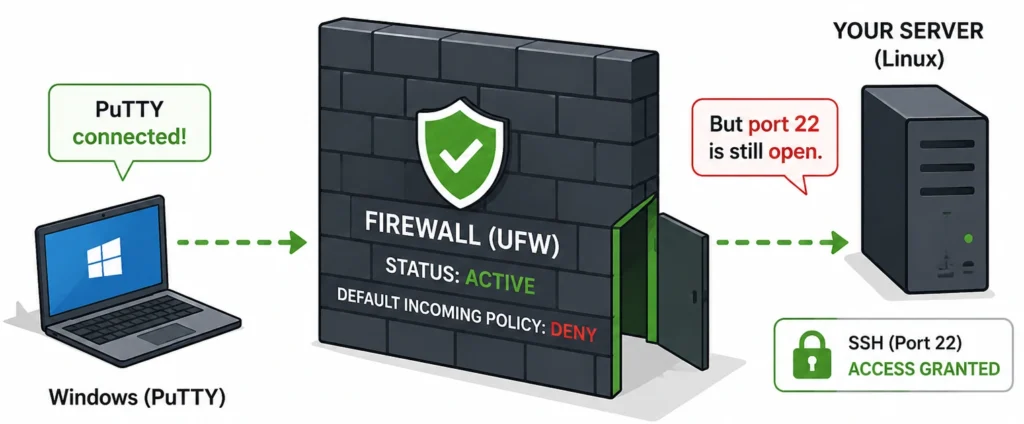
That is just what happened on a Linux box we were debugging. It was a genuine case of UFW active, but port open: UFW reported itself as active; the default incoming policy was set to deny, and there was no UFW rule allowing SSH. Yet a fresh PuTTY session from a Windows machine connected directly to the server’s public IP on port 22.
The firewall was not breached. Linux was doing exactly what the live rules ordered it to do.
The difficulty was that the UFW screen showed only part of the story.
UFW—Uncomplicated Firewall—is designed to make Linux firewall management easier. Instead of building packet-filtering rules manually, an administrator can express a policy in relatively simple commands:
sudo ufw default deny incoming
sudo ufw default allow outgoing
sudo ufw enable
Then:
sudo ufw status verbose
might show:
Status: active
Logging: on (low)
Default: deny (incoming), allow (outgoing), deny (routed)
That looks exactly like what you would expect from a server where unsolicited inbound traffic should be blocked.
And in this incident, ufw status numbered showed no rule permitting SSH.
So why was port 22 still open?
Since, UFW is a firewall-management layer, the actual packet decision is made by Linux’s Netfilter framework, and other tools or previously loaded configurations can also put rules into that packet path.
Ubuntu’s own UFW documentation makes this distinction explicit. ufw status shows basic firewall state and UFW-managed rules, while ufw show raw displays the complete live firewall. The same documentation notes that rule ordering matters: the first matching rule determines what happens when it reaches a terminating action.
That is where the investigation became interesting.
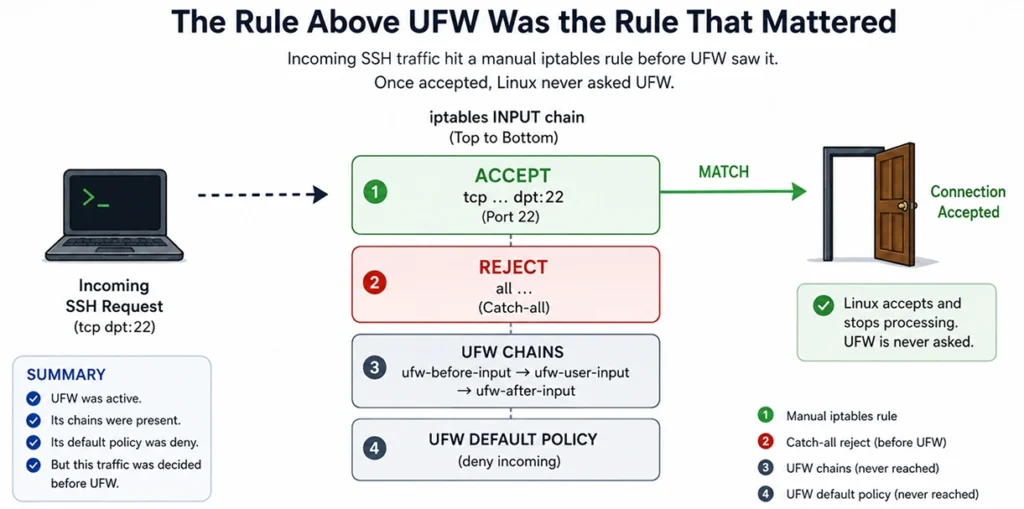
The live INPUT chain contained this:
4 ACCEPT tcp … state NEW tcp dpt:22
5 REJECT all … reject-with icmp-host-prohibited
6 ufw-before-logging-input
7 ufw-before-input
8 ufw-after-input
…
The important line was number 4:
ACCEPT tcp … dpt:22
Before traffic ever arrived at the UFW-managed chains, an earlier rule had already said:
Allow new TCP connections to port 22.
That one rule explained why UFW active, but port open was possible.
Firewall rules are not a collection of independent opinions. They form an ordered packet-processing path.
Consider an incoming SSH request.
It enters the INPUT chain and is tested against the rules in sequence. If it reaches:
ACCEPT tcp … dpt:22
and matches, the connection is accepted.
Linux does not continue down the chain and ask UFW whether it agrees.
In this case, the next rule made the situation even clearer:
REJECT all …
That was a catch-all rejection positioned before the UFW chains. Traffic that had not already been accepted was rejected there.
So, the effective path looked like this:
UFW was running.
Its chains were there.
It was configured correctly.
Except for this incoming traffic, its regulations were already established. The source interaction had exactly that sequencing, the port-22 ACCEPT, and then a terminating catch-all REJECT, with the UFW chains underneath.
And that’s the actual danger of a UFW iptables clash. This doesn’t mean that the two tools are obviously fighting each other or making mistakes. That could just mean that there are two methods maintaining firewall state independently, and admins are only seeing one of them.
On this server, UFW was not the only firewall-management mechanism present. iptables-persistent and netfilter-persistent were installed, and the persisted ruleset contained an SSH allow rule.
That rule could be restored independently of what UFW displayed.
Conceptually, the host looked less like this:
UFW
│
▼
Firewall
and more like this:
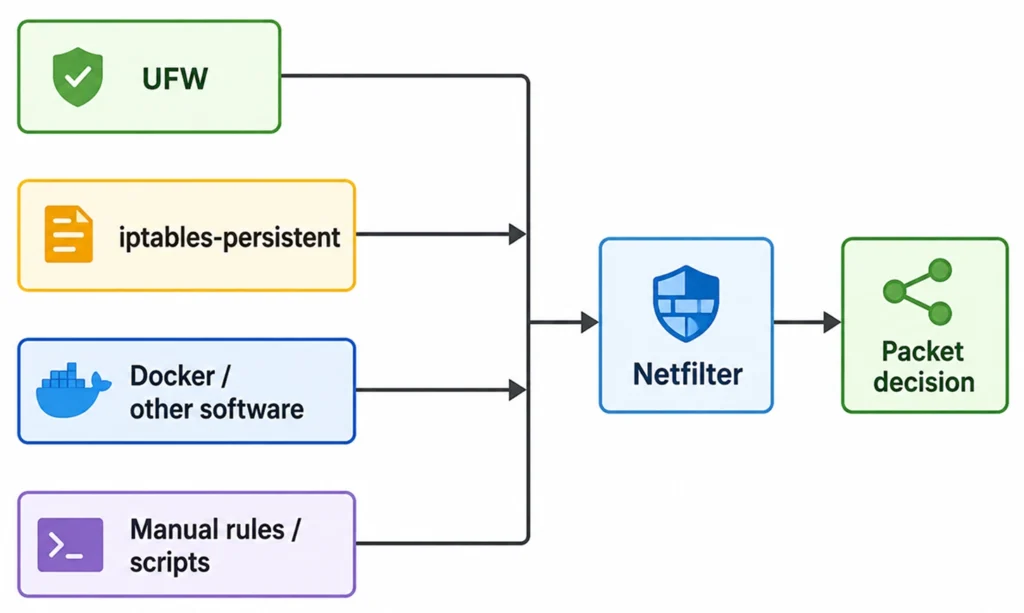
The kernel doesn’t care if a rule came from UFW, a cloud-image bootstrap procedure, an outdated administrator script or another program. It checks what is actually loaded.
That’s why when you have a working firewall and can still SSH, it’s not the right time to keep staring at the same UFW interface.
It is time to pose a different question:
Who actually owns the effective firewall policy on this machine?
It is as much a subject of infrastructure control as it is a question of Linux.
When many tools are allowed to mutate the same control plane, configuration drift is not an edge case. It is a condition of operation to be designed for.
A useful way to understand this problem, even without being a Linux firewall specialist, is to separate intent, enforcement and reality.
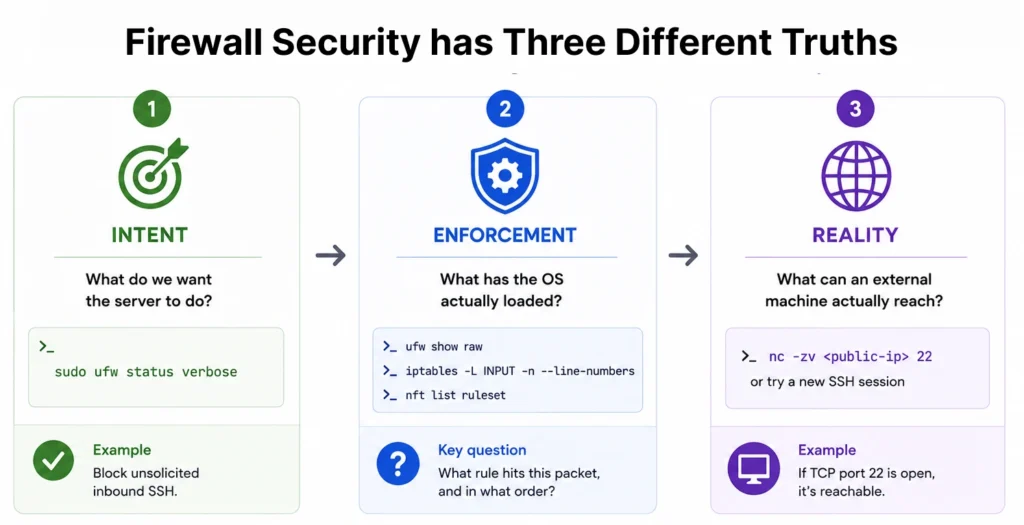
This is the configuration-management view.
For UFW:
sudo ufw status verbose
For another organization, the intent may live in Ansible, Terraform, cloud security policies, or an internal infrastructure platform.
In this incident, intent was clear:
Do not allow unsolicited inbound SSH.
There was nothing wrong with that intent.
This is where Linux firewall verification becomes more important than firewall status.
Useful checks include:
sudo ufw show raw
and, where applicable:
sudo iptables -L INPUT -n –line-numbers
or:
sudo nft list ruleset
The question is no longer:
Is UFW enabled?
It becomes:
What rule will this packet encounter, and in what order?
That is how the UFW not blocking port mystery was resolved.
This is the test that ultimately matters.
If TCP port 22 is supposed to be inaccessible from the Internet, try to connect to it from the Internet.
For example:
nc -zv <public-ip> 22
Or, as happened here, open a completely new PuTTY session from another machine.
The results of the original incident can be summarized simply:
| Question | Answer |
| Is UFW active? | Yes |
| Is the default incoming policy denied? | Yes |
| Does UFW show an SSH allow rule? | No |
| Can a fresh external SSH connection succeed? | Yes |
That final answer overrides all the comfort provided by the first three.
An attacker does not care what ufw status reports. They care whether the socket accepts their connection.
The next logical step after discovering the persisting port-22 rule was to remove it from the saved firewall configuration.
And did this.
Back to trying out PuTTY.
And it clicked back in place.
This proved the second vital lesson of the incident:
The settings on disk and the firewall loaded in the kernel are not the same thing, automatically.
The SSH rule had been changed in the persisted configuration, but the old rule was still live in memory. The subsequent iptables output still showed the port-22 ACCEPT.
Only after the effective ruleset was properly rebuilt/reloaded did the running firewall match the intended configuration.
Then the important test was repeated:
Fresh PuTTY connection to the public IP → failed.
The intended authenticated tunnel path still worked.
And then came a step that is easy to omit: reboot the machine and test again.
That matters because persistent firewall services, Docker, startup scripts or cloud-init mechanisms can reintroduce rules during boot. A security change that disappears after the next restart is not a completed remediation.
After rebooting, the unwanted SSH rule stayed gone, and direct SSH remained blocked.
The original port-22 issue was caused by the persisted iptables rule, not Docker. But Docker provides another good example of why looking only at UFW can give the wrong impression.
Take this common Docker Compose configuration:
ports:
– “8080:8080”
If a host IP is not supplied, Docker publishes that port on all host interfaces. Docker’s documentation states: “By default published ports are exposed to the outside world.
More crucially, Docker has comprehensive documentation on how it interacts with UFW: traffic to published container ports is forwarded through Docker’s networking rules before it goes through the standard INPUT and OUTPUT path that UFW uses. This can essentially ignore a UFW policy an administrator intended to enforce.
That is the familiar Docker UFW bypass problem.
Compare:
ports:
– “8080:8080”
with:
ports:
– “127.0.0.1:8080:8080”
The second form ties the published service to localhost instead of every host interface as is the default Docker configuration.
The point is not that all services have to be tied to localhost. The argument is that the real vulnerability of a modern Linux host is a function of numerous interacting layers.
A more honest network diagram is often:
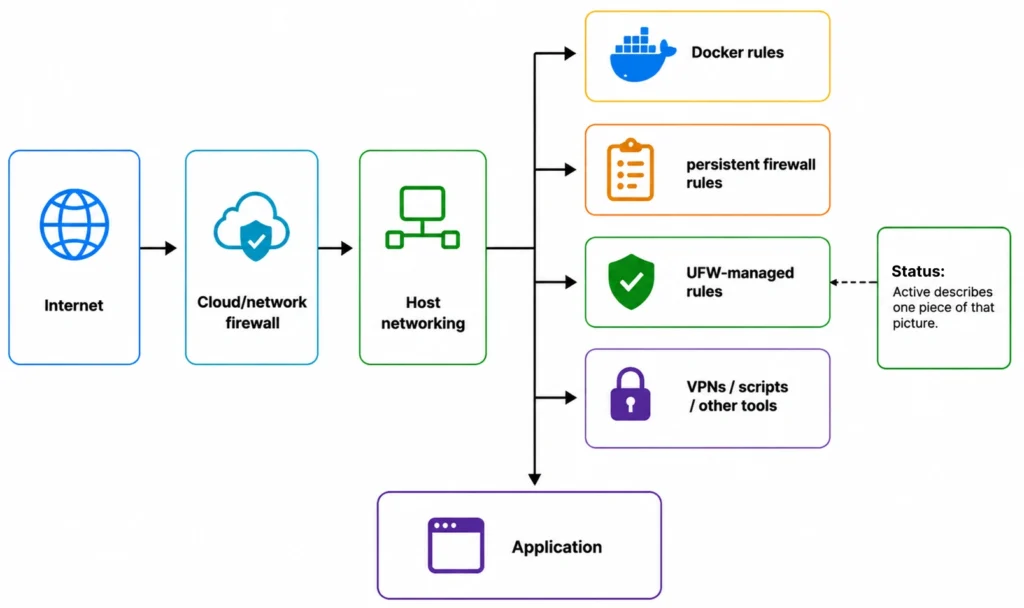
Status: active describes one piece of that picture.
It does not prove the outcome.
The practical takeaway from an UFW active, but port open incident is not to distrust UFW. UFW remains useful.
The lesson is to stop treating the management interface as the verification mechanism.
A meaningful firewall review can be surprisingly small.
First, inspect the intended policy:
sudo ufw status verbose
Then inspect what is actually listening:
sudo ss -tlnp
There is an important difference between a process listening on:
127.0.0.1:8080
and:
0.0.0.0:8080
Next, inspect the effective firewall state:
sudo ufw show raw
and, depending on the host:
sudo iptables -L -n –line-numbers
or:
sudo nft list ruleset
Then test the sensitive service from an external machine.
Finally, reboot and repeat the important checks.
That sequence validates four different things:
What we intended → what Linux loaded → what outsiders can reach → what survives restart.
That is a much stronger control test than checking whether a service reports itself as enabled.
In this case there was no weird kernel vulnerability.
No exploits for firewalls.
There was no magic way out of linux packet filtering.
Everything was doing what it had been told to do.
Which is precisely why the case is worth watching.
The server could honestly report any of the following:
UFW is running.
Default: deny (incoming policy)
UFW has no SSH allow rule.
And at the same time,
SSH from the public Internet works.
That’s why UFW activated, but port open is such a good security lesson.
A control can be healthy, but the system around it can defeat the result you want.
The same pattern holds true in several areas of infrastructure: a backup operation can claim success but no one has verified the restore; an access-control policy can be right while another endpoint bypasses it; a monitoring agent can be healthy while it observes the wrong item.
So, the better question is not:
“Is the firewall up?”
And it is:
Is the traffic we tried to restrict still able to reach the system?
One fresh PuTTY connection addressed that question more accurately than the word Active ever could.
If you find UFW active, but port open, approach it as a control-effectiveness issue, not just a firewall misconfiguration.
The priority is to determine which rules are truly managing traffic, remove conflicting or stale entries, test the impacted ports externally, and verify the outcome again after rebooting. For containerized or cloud-hosted systems, add Docker rules, persistent iptables rules, and cloud level controls to the same review.
Make external connectivity testing part of routine infrastructure assessment going forward. The aim is not just to verify that the firewall is turned on, but to demonstrate that the traffic you wish to block is indeed unreachable.
Fill Out the Form and Our Experts Will Contact You Within 24 Hrs
Connecting Claude to Self-Hosted Grist via MCP: Every Error We Hit in Order It frequently looks deceptively straightforward from the outside to…
Read
There are engineering issues that refuse to stay in a single spot. Ours began with integrating Claude with our self-hosted Grist database…
Read
Cloudflare WAF vs Azure Application Gateway WAF: When to Use Each? Choosing a web application firewall isn’t just about defending against attacks;…
ReadJust let us know your requirements, and we will deliver a curated shortlist of pre-vetted developers ready to interview.