
Your Firewall Says “Active.” But It Might Be Doing Nothing
Your Firewall Says “Active.” But It Might Be Doing Nothing A firewall is more like a security desk at the entrance of…
Read
It frequently looks deceptively straightforward from the outside to get an AI assistant to interact with an internal system. There is an MCP endpoint, an authentication flow, and a client that needs permission to use it. Connect the 3, complete OAuth and you should have the data.
That was the assumption we had when we began our Claude MCP Grist integration.
We already had our own Grist instance running, with users authenticating by Entra ID and the service fronted by Cloudflare and Traefik. The next step appeared simple: Expose the Grist MCP server, connect Claude, complete authentication, and start querying our data.
In reality, connecting Claude to Grist via MCP became something different.
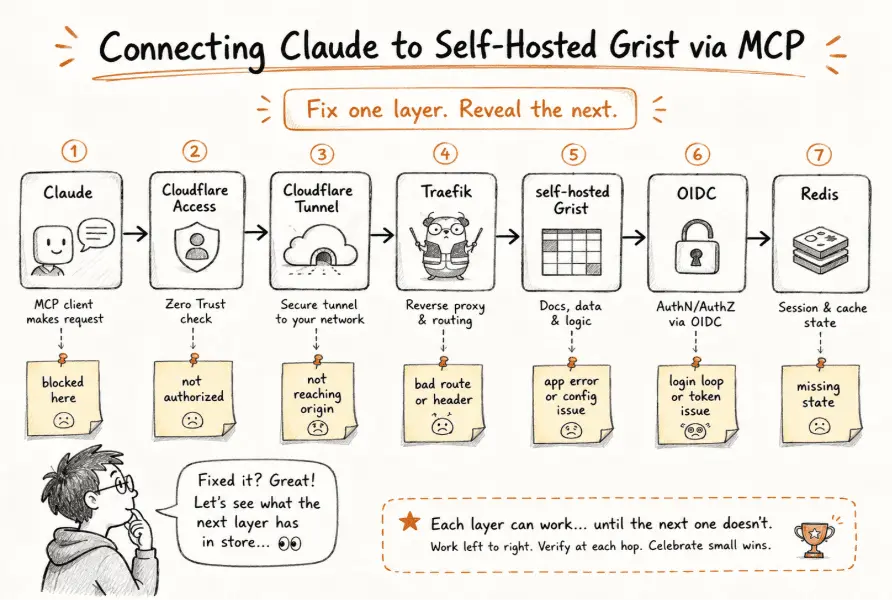
This request had to pass through:
Claude → Cloudflare Access → Cloudflare Tunnel → Traefik → self-hosted Grist → OIDC → Redis
And that dramatically changed the character of the problem.
No more debugging “Claude can’t connect to Grist.” We were debugging a request that had to pass through many distinct layers, each with its own authentication rules, routing behavior, state needs, and assumptions about the connection.
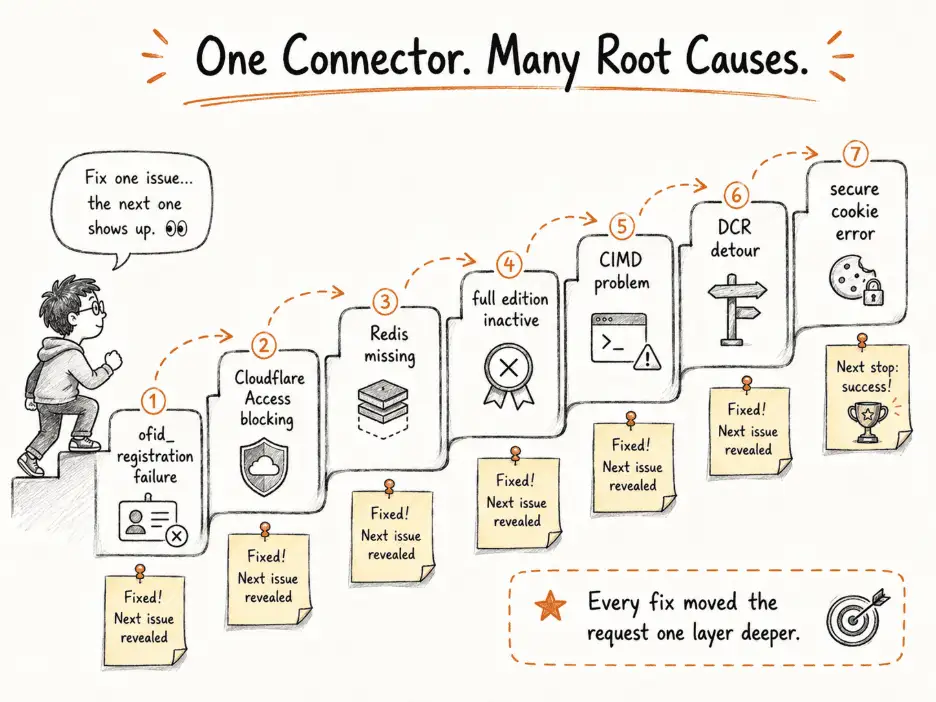
We would correct one level, and the request would shift a little further out and reveal the next problem.
The sequence went like this:
ofid_ registration failure → Cloudflare Access interception → Redis missing → Grist full edition inactive → CIMD registration trouble → DCR detour → secure cookie failure → X-Forwarded-Proto fix.
The final error was:
Cannot send secure cookie over unencrypted connection
This was especially puzzling as the browser was utilizing HTTPS.
This was the moment when the entire Claude Grist MCP setup finally made sense: this was not a single broken OAuth flow. It was a string of systems, each fix only working by passing the request on to the next system.
This is the complete story of Grist MCP integration, in the order we found it, what each error meant, what we first assumed, what was going on, and what eventually repaired it.
First Error: We Were Mixing Up Two Separate OIDC Jobs
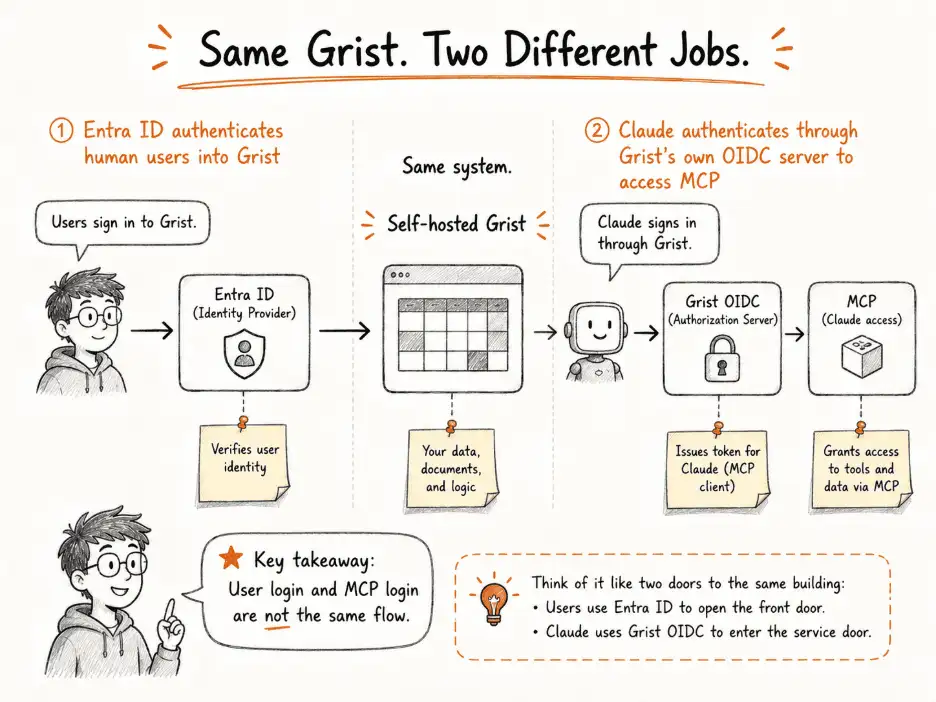
Our Grist instance was already authenticated with Entra ID.
So, when Claude didn’t make it, the natural thought was:
We already have OIDC. Why does Claude need anything more?
Our existing setup looked like this:
Human user
↓
Entra ID
↓
Grist
Claude needed a different direction:
Claude
↓
Grist’s OIDC server
↓
MCP access
Same Grist.
Different authentication relationship.
The interaction made this distinction explicit: the Entra-related GRIST_OIDC_* configuration controlled how users logged into Grist, while GRIST_ENABLE_OIDC_SERVER made Grist act as the OAuth/OIDC server for an external client such as Claude.
So, we configured:
GRIST_ENABLE_OIDC_SERVER=true
GRIST_OIDC_CIMD_ALLOWED_HOSTS=claude.ai,chatgpt.com
At that point, we had the first important mental model for the Claude Grist MCP setup:
User authentication ≠ MCP client authentication
Our first visible error was:
Couldn’t register with Grist’s sign-in service.
You can try again, or add an OAuth Client ID
in the connector settings.
If this persists, share this reference with support:
ofid_b0818c18b08aae1e
At first, that looked like a general OAuth failure.
The authorization request gave us a better clue:
client_id=https://claude.ai/oauth/mcp-oauth-client-metadata
That did not look like the client IDs we expected.
Compare the two:
Traditional client ID
client_id=abc123
versus:
Claude request
client_id=https://claude.ai/oauth/mcp-oauth-client-metadata
Claude was attempting the CIMD path. The interaction specifically identified that URL-shaped client_id as the metadata-document flow Claude was using.
But there was a more important question:
If our Grist settings were present, was Claude actually reaching Grist?
That shifted the investigation away from Grist itself and toward the infrastructure in front of it.

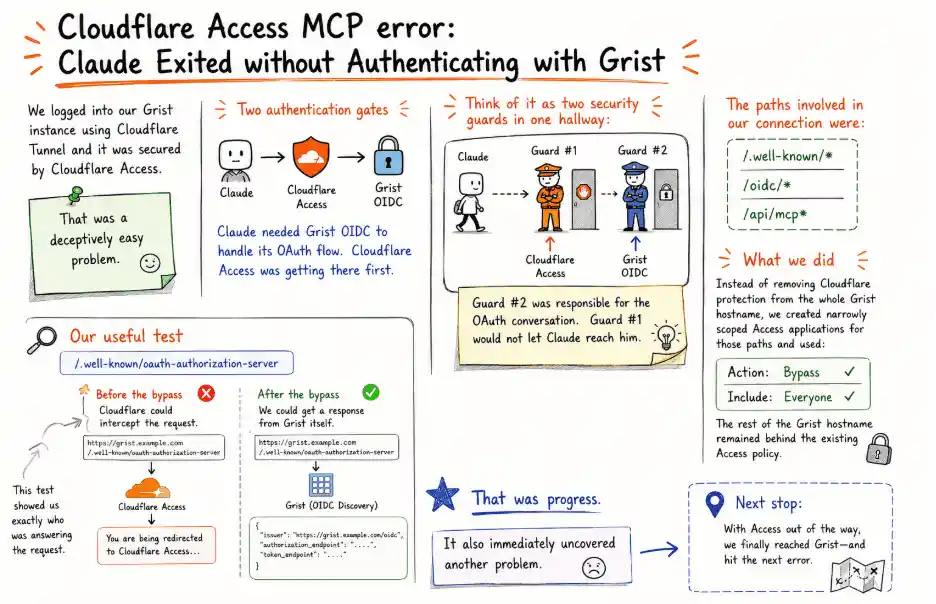
We logged into our Grist instance using Cloudflare Tunnel and it was secured by Cloudflare Access.
That was a deceptively easy problem.
There were now two authentication gates:
Claude
↓
Cloudflare Access
↓
Grist OIDC
Claude needed Grist OIDC to handle its OAuth flow.
Cloudflare Access was getting there first.
Think of it as two security guards in one hallway:
Claude → Guard #1 → Guard #2
↑
Cloudflare Grist OIDC
Guard #2 was responsible for the OAuth conversation.
Guard #1 would not let Claude reach him.
The paths involved in our connection were:
/.well-known/*
/oidc/*
/api/mcp*
So instead of removing Cloudflare protection from the whole Grist hostname, we created narrowly scoped Access applications for those paths and used:
Action: Bypass
Include: Everyone
The rest of the Grist hostname remained behind the existing Access policy.
Our useful test was:
/.well-known/oauth-authorization-server
Before the bypass, Cloudflare could intercept the request.
After the bypass, we could get a response from Grist itself.
That was progress.
It also immediately uncovered another problem.
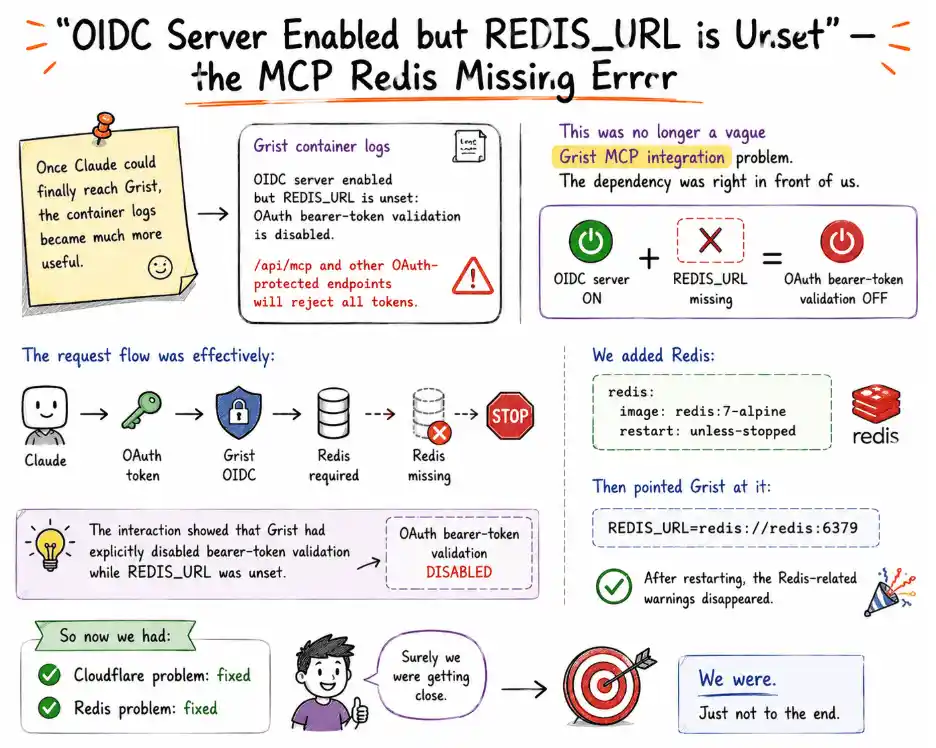
Once Claude could finally reach Grist, the container logs became much more useful:
OIDC server enabled but REDIS_URL is unset:
OAuth bearer-token validation is disabled.
/api/mcp and other OAuth-protected endpoints
will reject all tokens.
This was no longer a vague Grist MCP integration problem.
The dependency was right in front of us.
OIDC server ON
+
REDIS_URL missing
=
OAuth bearer-token validation OFF
The request flow was effectively:
Claude
↓
OAuth token
↓
Grist OIDC
↓
Redis required
↓
Redis missing
↓
STOP
We added Redis:
redis:
image: redis:7-alpine
restart: unless-stopped
Then pointed Grist at it:
REDIS_URL=redis://redis:6379
After restarting, the Redis-related warnings disappeared.
The interaction showed that Grist had explicitly disabled bearer-token validation while REDIS_URL was unset.
So now we had:
Cloudflare problem: fixed
Redis problem: fixed
Surely we were getting close.
We were.
Just not to the end.
Claude now reached an /oidc/auth request, but Grist responded with:
Could not find the requested page.
Please check the URL and try again.
We tested the discovery endpoint:
/.well-known/oauth-authorization-server
What is expected from an OAuth discovery request?
Structured OAuth information.
What was this about?
The Grist application instead.
That made us look at Traefik
Maybe the path was being re-written.
Maybe the proxy was serving the wrong route.
Maybe some middleware was interfering.
Traefik looked guilty.
It was not.
The true problem was that Grist’s complete edition had not been activated.
We have environment variables for the feature, but the feature was not activated. The interaction highlighted why the OIDC and discovery routes were dropping through to the Grist application shell.
This gave us another useful equation:
Feature configured ≠ Feature active
We activated the full edition through /admin.
Restarted Grist.
Tested again:
/.well-known/oauth-authorization-server
This time the discovery endpoint returned the expected response.
The OIDC layer was finally alive.
server_error – oops! something went wrong. — CIMD became the next Suspect
With discovery working, Claude moved farther into the flow.
And we got:
There was an error:

The authorization URL was still telling us something useful:
client_id=https://claude.ai/oauth/mcp-oauth-client-metadata
Claude was still using CIMD.
At this point the registration possibilities looked like:
┌── CIMD
Claude ────┤
└── DCR
So we enabled:
GRIST_ENABLE_OIDC_DCR=true
The assumption was straightforward:
CIMD causing trouble
↓
Enable DCR
↓
Claude uses DCR
But the next authorization request still contained:
client_id=https://claude.ai/oauth/mcp-oauth-client-metadata
Claude was still using CIMD.
The interaction records exactly this point: DCR was enabled, but the request continued to carry Claude’s metadata URL as its client ID.
So, we had learned something else:
Enabling an alternative registration mechanism does not prove the client is actually using it.
The authorization URL was more useful than the generic error message because it told us which path Claude had chosen.

During the troubleshooting, we then registered Claude as an OAuth application.
After that, something visible changed.
Before:
client_id=https://claude.ai/oauth/mcp-oauth-client-metadata
After:
client_id=rFJTSovm83sWhyRmu1WwB5
The precise value was not an important part.
The shape was.
URL-shaped client_id
↓
CIMD
Opaque client_id
↓
Registered OAuth app
Now we knew the Claude MCP integration was taking a different registration path.
That ruled out one uncertainty.
But the connection still produced:
server_error – oops! something went wrong.
Same visible error.
Different underlying stage.
At this point, the browser message had stopped being useful.
We needed the server logs.
With more detailed logs enabled, the real error finally appeared:
OIDCServer error:
Error: Cannot send secure cookie over unencrypted connection
This was the most confusing error in the whole Claude MCP Grist integration.
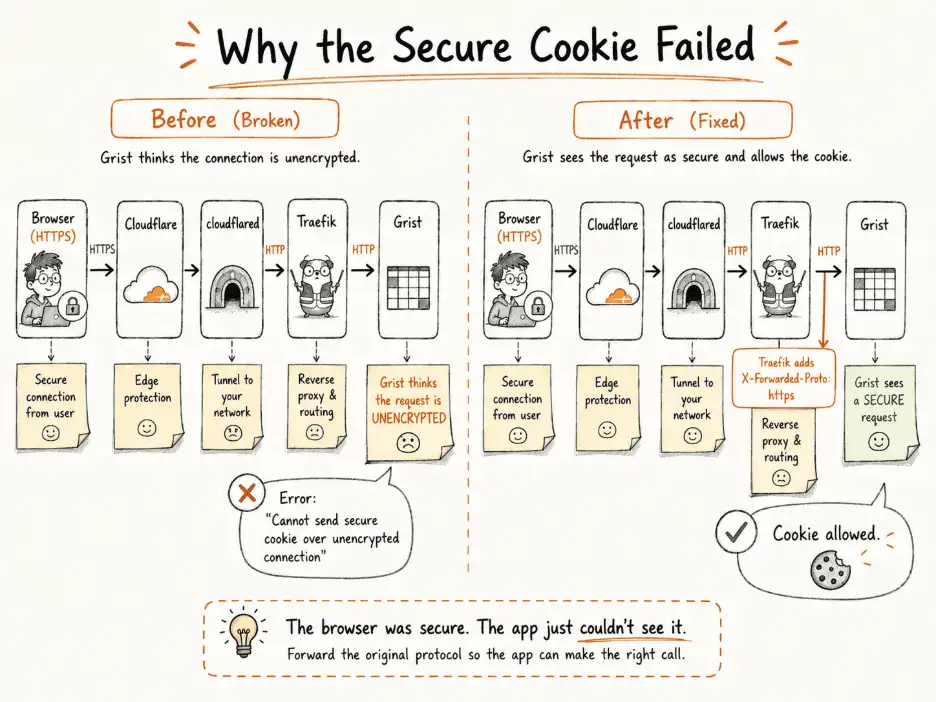
The browser was using HTTPS.
So why would Grist call the connection unencrypted?
Because the browser and Grist were not looking at the same hop.
From the outside:
Browser
↓ HTTPS
Cloudflare
But internally, the path continued:
Cloudflare
↓
cloudflared
↓ HTTP
Traefik
↓ HTTP
Grist
So we had:
What the browser knew:
HTTPS
but:
What Grist saw:
HTTP
The interaction’s stack trace exposed exactly this failure:
Cannot send secure cookie over unencrypted connection
and the investigation connected it to how X-Forwarded-Proto was being handled through the Cloudflare → Traefik → Grist chain.
The important header was:
X-Forwarded-Proto: https
It tells the application:
The internal connection reaching you may be HTTP, but the original public request was HTTPS.
Without that information, Grist’s OIDC provider behaved according to what it could see.
And what it could see looked insecure.
There was one more infrastructure detail in the interaction.
Our Traefik ports had originally been exposed as:
ports:
– “8080:8080”
– “8081:8081”
– “8083:8083”
Testing the public IP returned a 404.
That might sound safe.
It wasn’t.
A Traefik 404 proved that the request could reach Traefik; it simply did not match the required Host rule.
So, the bindings were changed to:
ports:
– “127.0.0.1:8080:8080”
– “127.0.0.1:8081:8081”
– “127.0.0.1:8083:8083”
The public IP was no longer able to reach those ports directly.
But the cookie error remained.
That gave us one final troubleshooting lesson:
Trust X-Forwarded-Proto
+
X-Forwarded-Proto is wrong or missing
=
Still broken
Trusting a header only helps when the correct header actually arrives.
Instead of relying on what arrived from upstream, Traefik was configured to explicitly send the original scheme information to Grist:
grist:
labels:
– “traefik.enable=true”
– “traefik.http.services.grist.loadbalancer.server.port=8484”
– “traefik.http.routers.grist.rule=Host(`${GRIST_DOMAIN}`)”
– “traefik.http.routers.grist.entrypoints=grist_ui”
– “traefik.http.middlewares.grist-https-proto.headers.customrequestheaders.X-Forwarded-Proto=https”
– “traefik.http.routers.grist.middlewares=grist-https-proto”
The line that mattered was:
X-Forwarded-Proto=https
Now the flow became:
Browser
↓ HTTPS
Cloudflare
↓
cloudflared
↓
Traefik
│
├── X-Forwarded-Proto: https
↓
Grist
↓
Request recognised as secure
↓
Secure cookie allowed
After the change and restart, the response in the interaction was:
“yes, that did it.”
That was the point at which the Claude Grist MCP connection finally worked.
Looking back, the failure chain was:
ofid_ registration failure
↓
Cloudflare Access blocking
↓
Redis missing
↓
Full edition inactive
↓
CIMD problem
↓
DCR detour
↓
Registered OAuth app
↓
Secure-cookie error
↓
X-Forwarded-Proto fix
↓
Connected
At the beginning, we kept asking:
Why isn’t the connector working?
That question was too broad.
A better sequence would have been:
Can Claude reach the hostname?
↓
Is Cloudflare Access intercepting it?
↓
Does OAuth discovery reach Grist?
↓
Is the Grist feature actually active?
↓
Is Redis available?
↓
Which registration path is Claude using?
↓
What does the authorization URL say?
↓
What does the server log say?
↓
Does Grist see HTTPS?
The deeper lesson from Connecting Claude to Grist via MCP was not a particular environment variable.
It was the debugging method.
A browser can say:
server_error
while the actual problem sits in:
an upstream access layer,
application state,
feature activation,
client registration,
or forwarded proxy information.
The visible error is just where the request finally gave up.
Our working path was:
Claude
↓
Cloudflare Access exceptions
↓
Cloudflare Tunnel
↓
Traefik
↓
X-Forwarded-Proto: https
↓
Self-hosted Grist
↓
OIDC
↓
Redis
With the OAuth client path sorted out during the troubleshooting. The interaction’s own recap records the final Grist MCP server connection as working with the OAuth app, Redis, full-edition activation, scoped Cloudflare Access bypasses and the Traefik X-Forwarded-Proto fix.
That experience also applies to custom AI chatbot development where an AI client must cross existing authentication, proxy, and application boundaries.
What looks like:
AI → data
may actually be:
AI
↓
access control
↓
proxy
↓
application
↓
authentication
↓
state
↓
data
If one layer disagrees with the next, the whole Claude MCP integration looks broken.
What started as a simple Claude MCP Grist integration developed into a complex infrastructure debugging exercise. The major progress occurred when we stopped considering the issue as one faulty OAuth flow and started testing each component independently.
Cloudflare Access, Redis, the full edition of Grist, CIMD, DCR, OAuth registration, Traefik, X-Forwarded-Proto were not separate distraction. They were distinct checkpoints in the same request path.
The fundamental lesson is simple:
Follow the request, verify each layer, and then continue to the next.
That’s how our Claude MCP Grist integration went from being one mystery OAuth problem to a series of discrete and testable challenges where each fix pointed out exactly where to look next.
Fill Out the Form and Our Experts Will Contact You Within 24 Hrs
Your Firewall Says “Active.” But It Might Be Doing Nothing A firewall is more like a security desk at the entrance of…
Read
There are engineering issues that refuse to stay in a single spot. Ours began with integrating Claude with our self-hosted Grist database…
Read
Cloudflare WAF vs Azure Application Gateway WAF: When to Use Each? Choosing a web application firewall isn’t just about defending against attacks;…
ReadJust let us know your requirements, and we will deliver a curated shortlist of pre-vetted developers ready to interview.