
Your Firewall Says “Active.” But It Might Be Doing Nothing
Your Firewall Says “Active.” But It Might Be Doing Nothing A firewall is more like a security desk at the entrance of…
Read
There are engineering issues that refuse to stay in a single spot. Ours began with integrating Claude with our self-hosted Grist database via MCP. What followed was a debugging trail of OAuth, Cloudflare Tunnel, Redis, Traefik, and a firewall rule that had outlived its usefulness by a long shot.
Fixing one problem didn’t fix the integration; instead, it revealed the next obstacle. We had gone through 6 failures in the stack before the connection succeeded. The complete trajectory somewhat looked like this: every mistake we made, what it really meant, and the correction that took us to the next level. We will walk through each of the six issues in the sequence we encountered them, along with the fixes that ultimately got the connection running.
The first blocker came before Claude could even connect to our self-hosted Grist deployment via MCP.
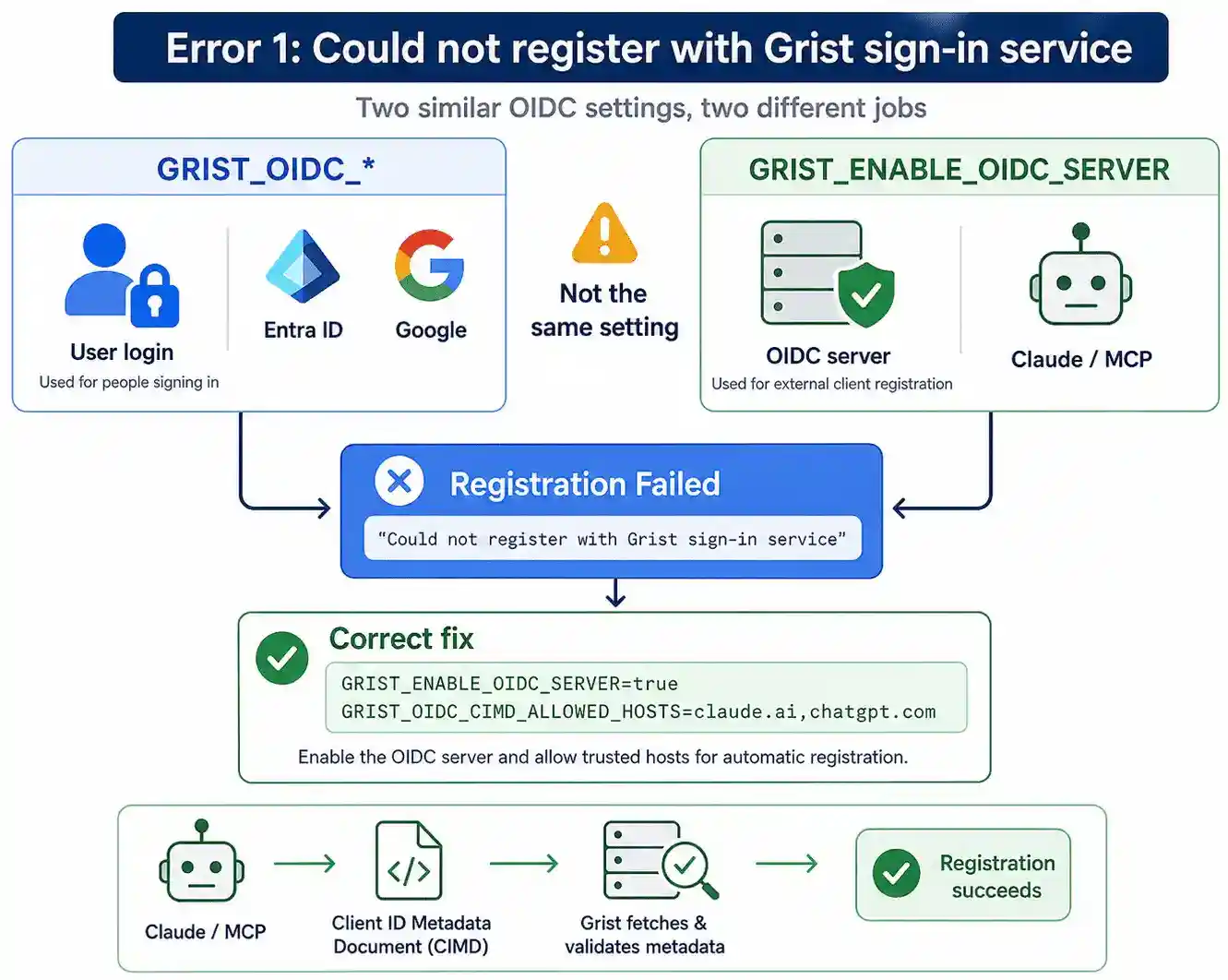
“Couldn’t register with Grist’s sign-in service. You can try again or add an OAuth Client ID in connection settings… share this reference with support: ofid_xxxxxxxxxxxxxxxx
Initially, it appeared like a sign-in problem, until it wasn’t.
The problem was that there were two OIDC configurations that looked identical but had radically different functions.
The GRIST_OIDC_ variables in Grist manage how users log in using providers such as Entra ID or Google. GRIST_ENABLE_OIDC_SERVER, on the other hand, enables Grist’s OIDC server for external clients like Claude. One setting does not automatically set the other, and so the registration kept failing.
We configured the OIDC server and defined the hosts that could register automatically.
GRIST_ENABLE_OIDC_SERVER=true GRIST_OIDC_CIMD_ALLOWED_HOSTS=claude.ai,chatgpt.com
This activates the Client ID Metadata Document (CIMD) flow. This means that Claude will reveal its metadata, and Grist will fetch and check that metadata before finishing registration.
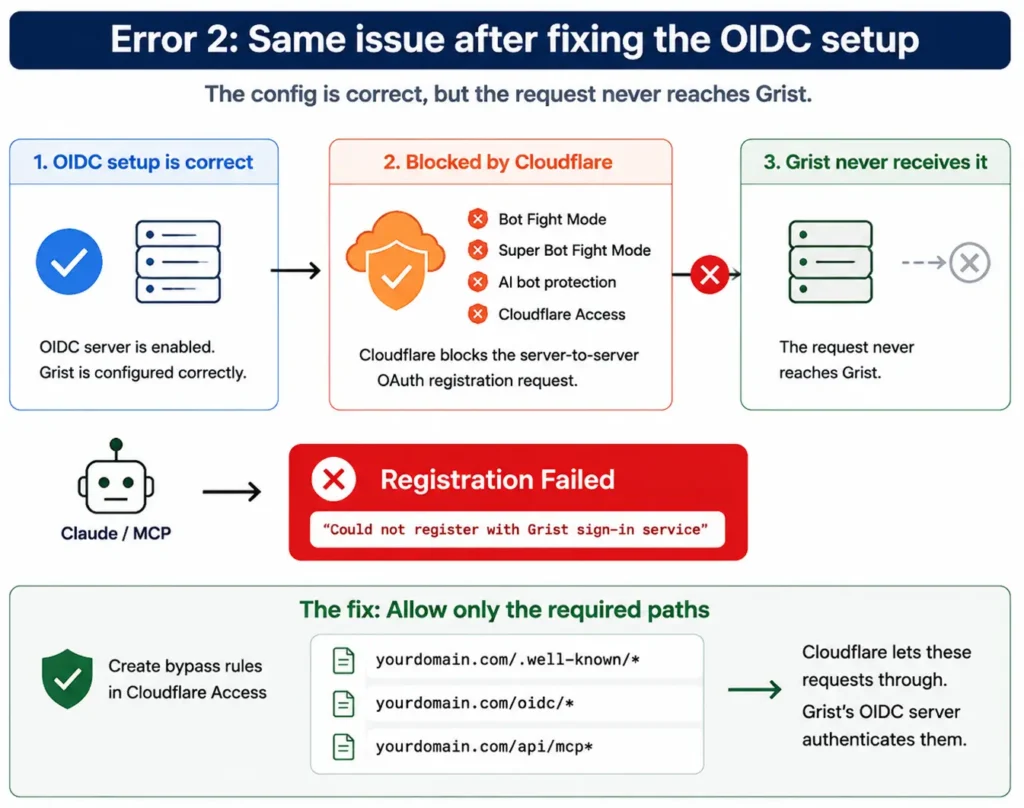
Enabling the OIDC server didn’t alter anything. The identical issue upon registration was still there, even though the necessary configuration was now present.
That means the problem was no longer on the Grist OAuth config.
The application never received the registration request.
We had our self-hosted Grist deployment sitting behind Cloudflare Tunnel, where Bot Fight Mode, Super Bot Fight Mode, AI bot protection, or Cloudflare Access would see the server-to-server OAuth registration request as bot traffic and prevent it from reaching Grist.
The simplest approach to check this was to look in Cloudflare Dashboard → Security → Events for blocked requests to /.well-known/*, /oidc/* or /register.
On the Cloudflare Free plan, we developed separate Access applications with Bypass policies for only the required endpoints:
yourdomain.com/.well-known/*
yourdomain.com/oidc/*
yourdomain.com/api/mcp*
This effectively disabled Cloudflare’s authentication layer just on certain pathways, but Grist’s OAuth server was still authenticating each request.
Once the registration problem was solved another notice appeared in the logs:
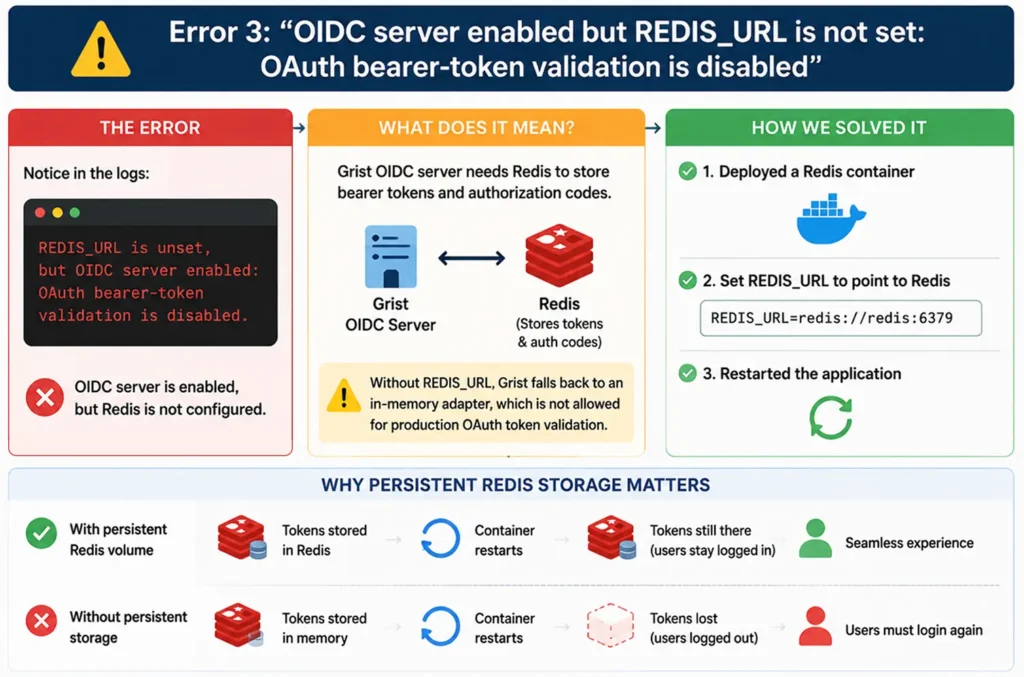
“REDIS_URL is unset, but OIDC server enabled: OAuth bearer-token validation is disabled.”
This was a different sort of error, and it pointed straight to the problem.
The answer was already in the log.
The Grist OIDC server required Redis to store bearer tokens and authorization codes. Without REDIS_URL, the app defaulted to an in-memory adapter, which it explicitly refused to use for production OAuth token validation.
We deployed a Redis container and set REDIS_URL to point to it and then restarted the application.
We also made sure the Redis volume was persistent. Without persistent storage, existing tokens would be invalidated when a container is restarted, and connected clients would have to authenticate afresh.
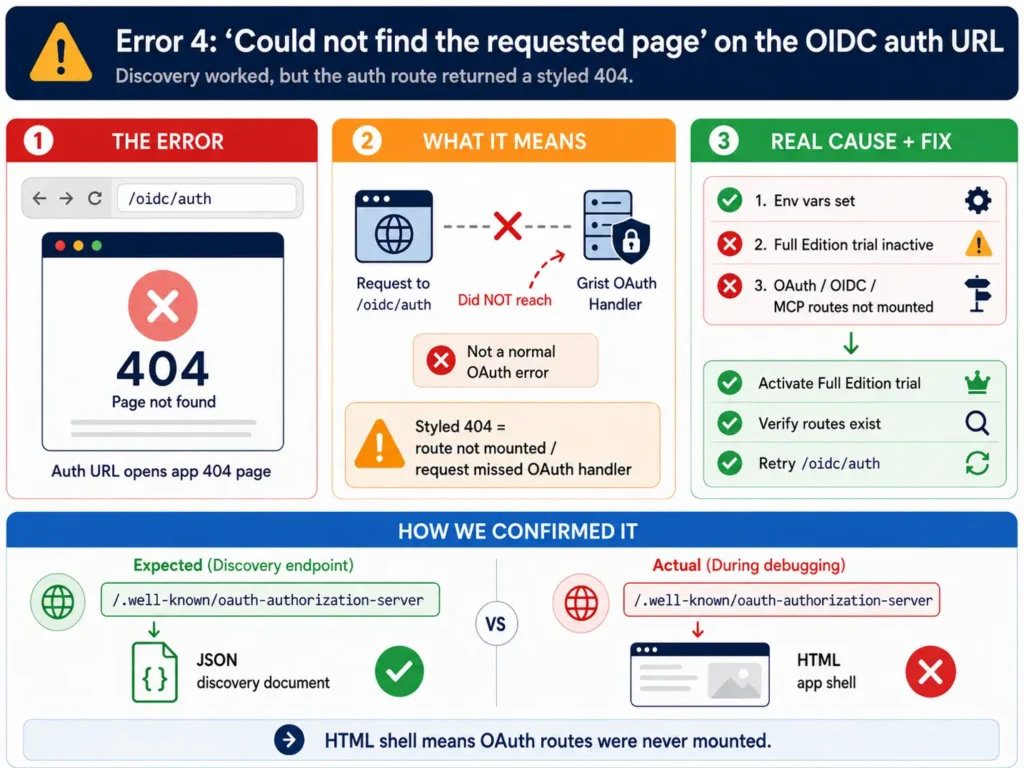
The OAuth discovery endpoint was now returning the expected response, but the actual /oidc/auth URL failed with a “Could not find the requested page” error.
Unlike a standard OAuth error, this was the application’s own styled 404 page, a minute detail that changed the direction of our investigation.
A styled 404 indicates the request never made it to the Grist OAuth handler.
Our first assumption was that Traefik was rewriting unknown routes to index.html by an SPA fallback rule. The real reason was the self-hosted Grist edition. The environment variables were set properly, but the OAuth, OIDC, and MCP routes weren’t mounted because the Full Edition trial wasn’t active.
Before spending more time debugging the reverse proxy, we verified that the routes we needed actually existed.
The problem was confirmed by querying the /.well-known/oauth-authorization-server endpoint. Instead of the expected JSON discovery document, it returned the HTML shell of the application, indicating that the OAuth routes had never been mounted.
The connection failed with the discovery endpoint returning JSON and the authentication URL hitting the appropriate handler. This time there was no helpful stack trace, just a clean restart of the application, followed by the identical server_error message.
The logs were not the clue; the clue was in the discovery response.
The underlying OIDC library still tagged Client ID Metadata Document (CIMD) as experimental. Claude preferred the advertised CIMD flow and kept using that way even though it was not working reliably in this arrangement.
We enabled Dynamic Client Registration (DCR).
GRIST_ENABLE_OIDC_DCR=true
We then removed GRIST_OIDC_CIMD_ALLOWED_HOSTS, which prevented the client from selecting the CIMD flow and forced it to use the DCR path instead.
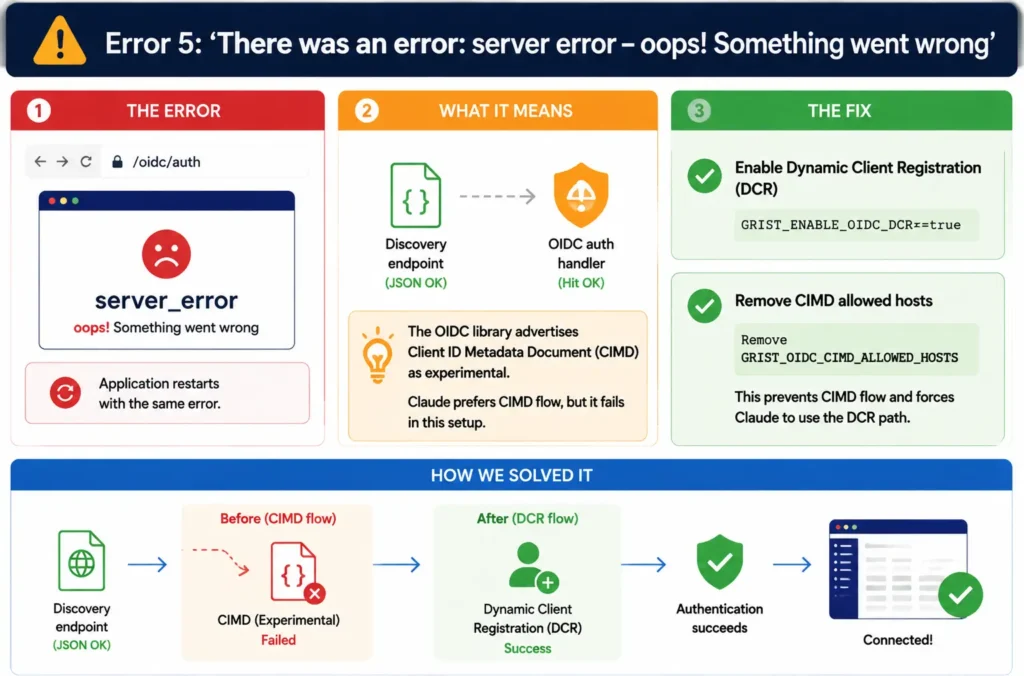
Changing to Dynamic Client Registration confirmed that client registration was working, yet the connection still failed.
The logs eventually revealed the genuine problem.
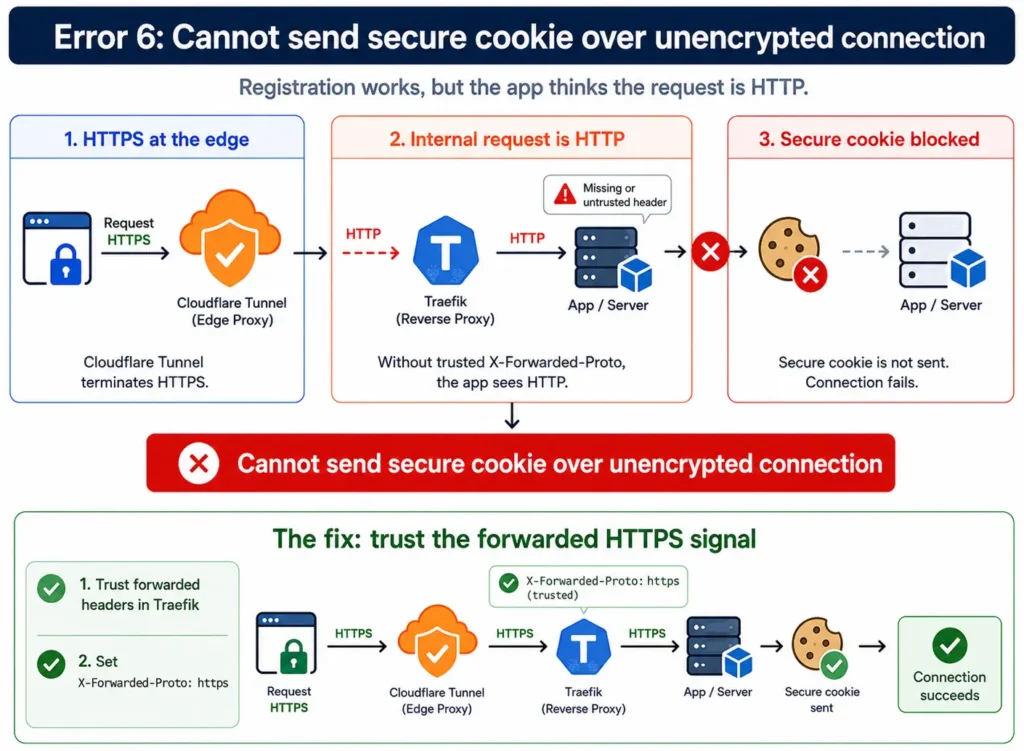
Error: Cannot send secure cookie over unencrypted connection
The difficulty ceased to be OAuth registration. That’s what the self-hosted Grist deployment read from the inbound request.
The app was operating behind Cloudflare Tunnel and Traefik, where HTTPS terminated at the edge, and the internal connection was HTTP. The application used the X-Forwarded-Proto header to determine if the initial request was secure and would not set a secure cookie.
The fix has two sides.
First, we set up Traefik to trust forward headers on the entry point. Then we explicitly specified X-Forwarded-Proto: https via a middleware so every request hitting the application was recognized as HTTPS.
When that header was sent in the right way, the connection was successful.
We had to actually look at our network exposure to hook Claude up to our self-hosted Grist database through MCP, and we didn’t love what we saw.
ufw status reported deny incoming, but iptables -L INPUT showed that the true kernel chain included an irrelevant ACCEPT… dpt:22 rule sitting ahead of UFW’s own chains, plus a hardcoded REJECT ALL rule from the cloud provider’s stock image that made every UFW rule following it unreachable.
We were told that UFW was “enabled,” which told us nothing about what was actually enforced.
If you are running on a cloud VM, check raw:
iptables -nvL INPUT
Rather than just trusting what your firewall tool says. Cloud images are often shipped with baked-in rules that silently override whatever you configure later.
Docker Default Ports: docker-compose mappingyml binds to 0.0.0.0 — all interfaces — no matter your host firewall.
Run:
curl -H “Host: yourdomain.com” http://your-public-ip:PORT/
When it sends your application back, rather than timing out, anyone on the internet can access it directly and completely bypass Cloudflare, Access policies, and bot protection.
After your Claude MCP traffic goes through Cloudflare Tunnel at all, the argument to have SSH in the same tunnel (or a Bastion service at a cloud provider) and to block port 22 at the network layer entirely is compelling.
No IP allowlists to keep.
No dynamic-IP headaches.
A personal SSH key with a passphrase will also never be automatically run with a backup script.
The low-effort fix is a dedicated deploy key, which is scoped to write access on only a single repository, and which means that a leaked key cannot do much besides pushing backup commits.
Every one of these boiled down to the same core idea:
Somewhere in the chain – Cloudflare, your reverse proxy, your app’s edition gate, or the underlying OAuth library – there was a default that presumed a simpler deployment than the one we really have.
This is a perfectly normal architecture to have Claude connect to a self-hosted Grist database via MCP. It’s also the kind of arrangement where “works on localhost” doesn’t mean “works in production.”
None of these were exotic solutions.
All they needed to do was read the real log line in front of them, validate one layer at a time, and not presume where the problem was.
The point of connecting Claude to a self-hosted environment via MCP was not about fixing one configuration problem, but about how OAuth, Cloudflare Tunnel, reverse proxies, and infrastructure defaults would work together throughout the stack. Following the steps carefully and addressing each blocker ultimately resulted in a successful connection and a more robust deployment. That’s how we approach engineering challenges at Bloom Consulting Services: methodically, layer by layer, until everything works out as it should.
Fill Out the Form and Our Experts Will Contact You Within 24 Hrs
Your Firewall Says “Active.” But It Might Be Doing Nothing A firewall is more like a security desk at the entrance of…
Read
Connecting Claude to Self-Hosted Grist via MCP: Every Error We Hit in Order It frequently looks deceptively straightforward from the outside to…
Read
Cloudflare WAF vs Azure Application Gateway WAF: When to Use Each? Choosing a web application firewall isn’t just about defending against attacks;…
ReadJust let us know your requirements, and we will deliver a curated shortlist of pre-vetted developers ready to interview.