Microsoft Azure Cloud: Key Services and How It Works
Businesses are searching for platforms that offer more than just basic infrastructure resources in today’s digital landscape. This is why cloud computing has become an on-demand service because of its flexibility and adaptability. In this regard, Microsoft Azure Cloud is mostly valued by businesses. It is a general term that covers Microsoft’s whole cloud ecosystem, meant to support contemporary, scalable, and secure digital environments.
In this blog, we will discuss Microsoft Azure services to inform you about the platform and the way it can serve your business needs. Learning more about how Microsoft Azure works helps you use cloud computing to design, implement, and scale solutions smartly.
Table of Contents
What is Microsoft Azure Cloud?
Microsoft Azure Cloud is Microsoft’s integrated cloud computing platform that has revolutionized the way businesses use infrastructure resources. Azure was started in 2010, initiating an impressive change from traditional on-premises datacenters to cloud computing services that could be scaled and altered as needed. It lowers the cost, complexity, and time required to manage physical infrastructure by providing users with access to a worldwide network of data centers run by Microsoft.
Azure is more than just infrastructure. It has a lot of services for AI, data, and applications that work together to make a single Azure cloud ecosystem. The platform makes it easy to build, manage, and scale apps. This makes businesses at any point in their cloud or AI transformation journey rely on it.
Read More : Why Would You Choose Microsoft Azure Cloud for Your Business?
The types of Microsoft Azure Cloud Services are –
Infrastructure as a Service (IaaS): It gives businesses full control over their cloud-based computer resources, so they can manage servers, storage, and networking.
Platform as a Service (PaaS): It allows developers to create and run apps without having to worry about managing the infrastructure that supports them.
Software as a Service (SaaS): It gives you fully hosted software apps that are ready to use and are handled and maintained by Microsoft
Key Services Offered by Microsoft Azure Cloud
Microsoft Azure Cloud is a premier platform that extensively helps businesses modernize their operations, grow quickly, and explore possibilities. It delivers full-scale cloud computing services that make it easier to develop applications, manage data, and keep networks secure. Here are the essential services offered by Microsoft Azure Cloud.
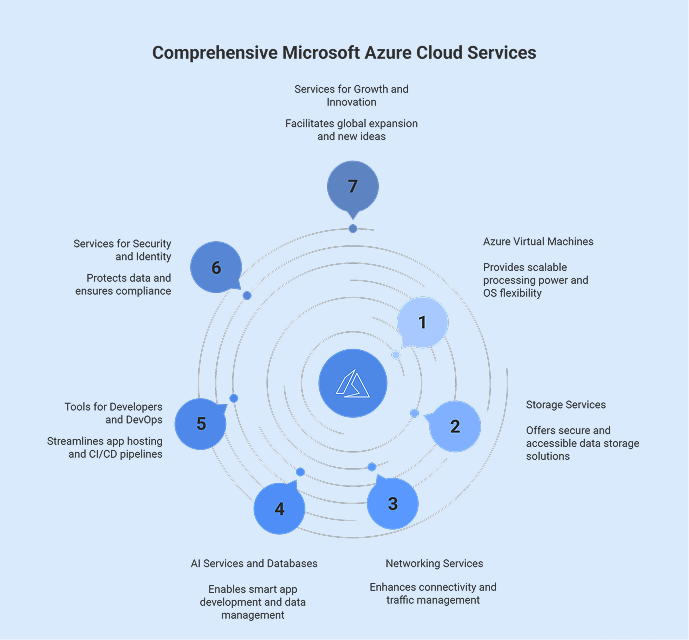
Azure Virtual Machines
VMs give you the processing power when you need it and let you run many different operating systems and workloads. This Microsoft Azure Cloud service allows you to create development, testing, and production environments without having to buy new gear. The pay-as-you-go price option makes sure that costs are low. Its integration with the Azure cloud infrastructure makes it reliable and available.
Storage Services
Azure storage services let you store files, apps, and data in a safe and scalable way. Blob Storage, Disc Storage, File Storage, and Data Lake Storage are some of the most important options available within this. These services let you access data from anywhere in the world, back it up, recover from disasters, and work well with other Microsoft Azure services.
Networking Services
Azure networking services link cloud and on-premises infrastructure while improving performance. Core services include Virtual Networks (VNet), Load Balancer, VPN Gateway, and ExpressRoute. These Micro Azure Cloud services make it possible for secure communication, high availability, and effective traffic management across several locations.
AI Services and Databases
Azure SQL Database, Cosmos DB, and MySQL/PostgreSQL are just a few of the managed database services that Microsoft Azure Cloud offers. These services help businesses manage relational, NoSQL, and in-memory data more effectively. Azure AI and Machine Learning services make it possible to build smart apps, get insights from data, and create AI-powered solutions that can scale effectively.
Tools for Developers and DevOps
Azure App Service is a safe and flexible place to host web, API, and mobile apps. You can run code using Azure Functions without having to worry about the server. Setting up CI/CD pipelines, source control, and agile procedures is easier with Azure DevOps. It works with various platforms and programming languages to make apps that businesses can use.
Services for Security and Identity
Microsoft Entra ID controls access to apps and resources. Azure Security Center watches over workloads and keeps them safe from attacks. Azure Key Vault, on the other hand, keeps sensitive data like passwords, keys, and certificates protected. These services make sure that businesses abide by the rules and protect their workloads on the Azure cloud platform.
Services for Growth and Innovation
Microsoft Azure Cloud for businesses is a complete cloud ecosystem that includes AI, security, networking, storage, and computing capabilities in a unified place. It helps businesses expand globally, cut expenses, come up with new ideas faster, and use Microsoft Azure technologies that are secure. Businesses can easily handle digital workloads and upgrade the way they work with modern cloud computing services because of a robust cloud platform.
These services make it easier for businesses to understand how to use the platform efficiently for business needs. The Azure cloud services explained are relevant for managing business operations.
Find out how the right Microsoft Azure Cloud service can help you improve performance for your business.
Dive Into Azure Cloud Services Now

How Microsoft Azure cloud works?
Azure is a trusted enterprise cloud platform that helps businesses design, deploy, and manage applications efficiently. Let’s find out how it works.
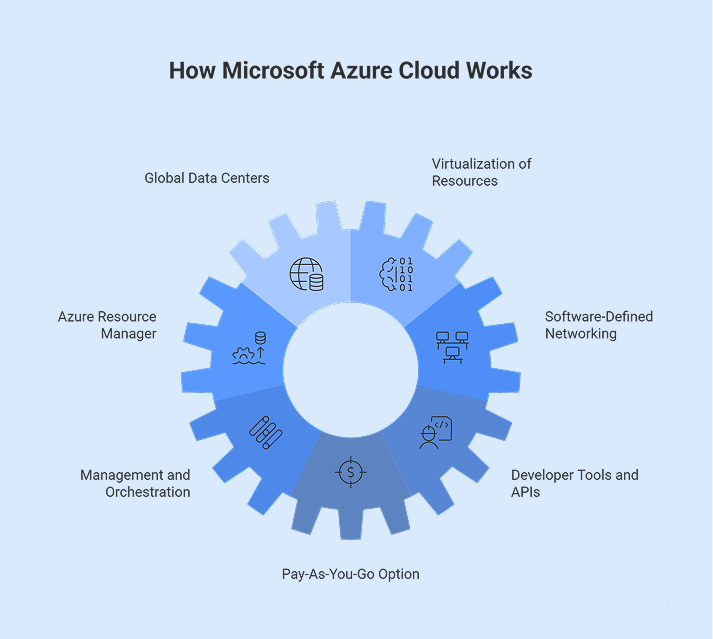
A worldwide network of data centers
Microsoft Azure Cloud works through a network of data centers managed by Microsoft in more than 70 regions across the world. These buildings have servers, storage devices, and networking equipment that make sure that enterprise workloads are always available and have low latency.
Virtualization of Resources
With the digitalized capabilities of Microsoft Azure, you may make independent instances of storage and compute on the same piece of hardware. This supports IaaS, which allows companies to expand without having to buy and set up their own servers.
Azure Resource Manager (ARM)
ARM is the layer of Microsoft Azure Cloud that takes care of deployment and administration. Through the portal, APIs, or command-line tools, it automatically adds, changes, and removes resources.
Software-Defined Networking
Software-defined networking is used by Microsoft Azure Cloud to handle virtual networks. You may set up routing, security policies, and connections without having to change any physical hardware. This makes it possible for applications to network safely and flexibly.
Management and Orchestration
To keep performance steady, Microsoft Azure Cloud automates the provisioning, scaling, recovery, and termination of resources. This makes sure that the Microsoft Azure cloud for enterprises stays up and keeps running by automatically moving workloads when systems fail. This makes the service more reliable and effective.
Tools and APIs for Developers
Microsoft Azure Cloud provides strong APIs and developer tools that make it easier to construct, implement, and manage applications. Azure cloud computing allows businesses to use services in IaaS, PaaS, and SaaS models while still having control and flexibility over their environments.
Pay-As-You-Go Option
Microsoft Azure Cloud offers a consumption-based pricing model that ties charges to real use. This lets businesses easily increase their resources and get the most out of their money without having to invest in infrastructure up front.
This clearly explains how Microsoft Azure Cloud makes digital operations more efficient, agile, and reliable.
Conclusion
In fine, Microsoft Azure Cloud deserves special attention because it adapts to the changing needs of organizations. Azure gives businesses the freedom to progress and configure by constantly upgrading its infrastructure, data platforms, analytics, AI capabilities, and application services. Microsoft Azure solutions help businesses make improvements by letting them update their processes, react immediately to market changes, and design policies that will be relevant in the future. Overall, Azure is a stable and flexible platform for attaining growth and long-term value because it puts a lot of emphasis on choice, security, and continuous improvement.
Want to grow faster with Microsoft Azure Cloud? Connect with Bloom today to get expert guidance with your cloud strategy.
Frequently Asked Questions
Q1. What is Azure Cloud?
Azure Cloud is a cloud platform for businesses that allows them to develop, manage, and scale applications while also enabling a variety of cloud-based services. It helps businesses make smart solutions, solve problems, and come up with new ideas for future use. Azure makes it easier to manage multiple workloads by centralizing application management. This helps businesses run more smoothly in a cloud environment.
Q2. What is Microsoft Azure used for?
Companies in many fields utilize Microsoft Azure to handle heavy workloads. This makes it easier for everyone to work together and develop new ideas. It is essential for scenarios like operating major enterprises, undertaking complex research, and working on tech projects that demand a lot of planning and attention. Azure helps businesses manage data, apps, and communication on a large scale. It can be helpful for anything, from scientific projects to running global business processes.
Q3. Is Microsoft Azure a public cloud service?
Microsoft Azure is indeed a public cloud service that provides shared cloud infrastructure that businesses all around the world can use. It is part of a larger public cloud ecosystem that includes other big names like AWS, Google Cloud, Oracle, and IBM Cloud. These platforms have various capabilities and designs because public cloud environments are not fully standardized.
Q4. What are the benefits of Microsoft Azure?
There are many benefits of Microsoft Azure cloud computing. It can add or remove resources as needed. This lets companies modify their resources depending on how much work they have to do. It works with hybrid clouds, which makes it easier to connect to infrastructure that is already in place. Azure also provides advanced AI, analytics, and big data solutions that may help you make smarter choices. It also includes robust security and compliance measures that protect your data and make sure it is always available.
Q5. Why should you choose Microsoft Azure for your business?
Microsoft Azure is a strong cloud ecosystem that works with SaaS, PaaS, IaaS, and tools from other companies. Its pay-as-you-go strategy makes it easy to scale up without spending too much money. Also, its automation capabilities and global data centers make it more reliable. With this, companies can safely store data, become stable after disruptions, and make solutions that fit their unique needs.
Q6. Why is Microsoft Azure the best cloud computing platform?
Microsoft Azure is different because it is flexible, cheap, and can grow with your needs. It has a lot of features like AI, storage, networking, and computing. This makes it easy for businesses to quickly make changes and improvements. Azure is also a good alternative for big firms that wish to adopt cloud-based solutions because it provides enterprise-level security and compliance.
Q7. What are cloud services?
Cloud services are IT resources that you can use over the Internet. These services let you pay based on how much you use them. You can buy servers, storage, networks, and security frameworks as per your needs from cloud vendors. This process lets businesses quickly build, run, and scale apps and maintain operations. This reduces costs and makes IT management more flexible and easier.
Q8. What is cloud computing and how does it work?
Cloud computing eliminates the use of physical infrastructure and lets everyone use apps and computing resources like networks, storage, etc., over the internet. You can use a web browser or an app interface to access these resources, which run on cloud infrastructure. This makes it easier to use them from any device at any time.
Q9. Why is cloud computing important?
Cloud computing is important because it makes businesses run smoothly without physical infrastructure. It cuts expenses and makes things less complex. It is very flexible and scalable, and allows organizations to use resources as per their needs. Cloud-based solutions allow teams to coordinate seamlessly by letting them access information from a common place. Moreover, strong security features keep sensitive information safe.


Recent Posts
- Azure Cloud Architecture Explained: A Simple Guide for Enterprises
- CI/CD Pipeline Setup in Azure: Best Practices for 2026
- DevOps vs DevSecOps: What’s the Difference?
- Hire Azure DevOps Developers Who Deliver Faster, Secure CI/CD Pipelines
- Azure Virtual Machines vs Containers: What’s Right for Your Infrastructure?