A Practical Guide to Building Intelligent Apps with Microsoft Cognitive Services
In recent years, businesses have incorporated some sort of cognitive computation, like Microsoft Cognitive Services, into their work to make working smarter. It aids in process efficiency, more accurate and thorough data analysis, and improved customer engagement, along with several other benefits. Unquestionably, this only happens in the presence of the right cognitive services.
Due to its evolution, it is now referred to as Azure Cognitive Services and has become a core component wherever “AI” is discussed in conjunction with other names. Developers can create sophisticated AI applications without deep expertise.
In this blog, we will look at the role of Microsoft Cognitive Services in helping businesses create scalable AI applications in order to stay competitive.
What are Microsoft Cognitive Services?
Microsoft Cognitive Services, now widely integrated into Azure AI, are a set of cloud-based APIs and SDKs that allow developers to incorporate advanced AI capabilities (like vision, speech, language, and decision-making intelligence) within their applications easily. In its use of APIs, human-like intelligence can be applied to complex tasks and does not always require extensive Machine Learning expertise.
There needs to be these ready-to-use, pre-trained services to take charge of AI’s complexity in the background while allowing developers to focus on creating state-of-the-art user experiences in light of all mechanisms, from text-to-speech, language translation, sentiment detection, and image analysis.
Read More : What are Cognitive Services in Azure: Features & Benefits?
What is the Need for Microsoft Cognitive Services for Developers?
Microsoft Cognitive Services are essential services that facilitate the work of developers by providing plug-and-play AI capabilities such as vision capability, speech, Natural Language Processing, and decision intelligence through simple APIs. In turn, developers no longer need to spend ages of understanding, building, and training complex machine learning models, as they can now focus on more critical core functionalities. It increases the pace of development cycles, reduces the cost of project development, and bridges the gap between basic and advanced AI applications.
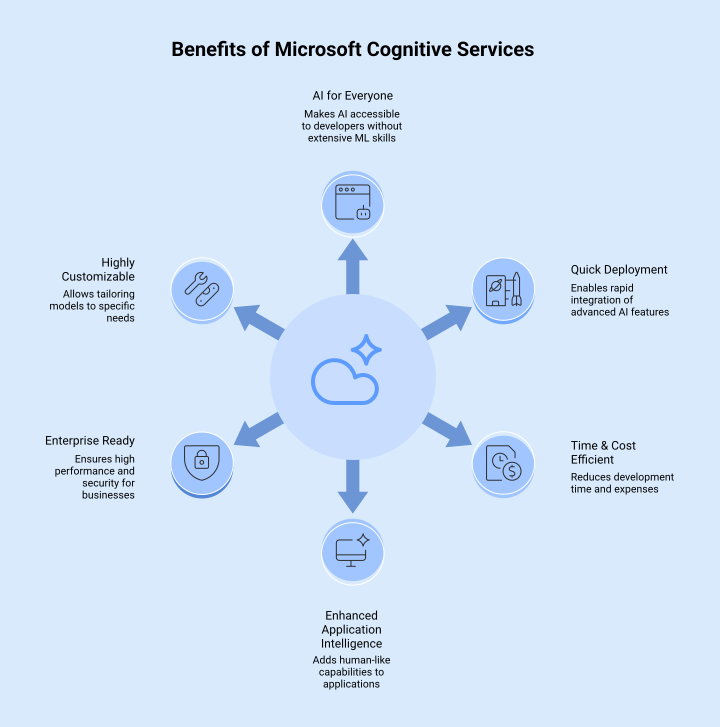
- AI for Everyone: Facilitates the use of AI technologies for developers who do not need to possess sophisticated machine learning skills.
- Quick Deployment: Quick ways to implement advanced AI are available.
- Time & Cost Efficient: By eliminating requirements for a large dataset, model training, and complete infrastructure setup.
- Enhanced Application Intelligence: Enables applications to mimic human-like capabilities such as seeing, speaking, and reasoning.
- Enterprise Ready: The solution ensures high performance, reliability, robust security, and scalability.
- Highly Customizable: Developers can customize models to suit organizational or industry-specific requirements, including Custom Vision and Custom Speech models.
Master Microsoft Cognitive Services in Practice

What are the Use Cases of Microsoft Cognitive Services?
This service allows software developers to provide AI capabilities such as vision, speech recognition, decision-making, data analysis, and natural language processing. Indeed, customer support applications, sentiment analysis of user responses, product image detection, speech-to-text transcription, and personalized e-commerce recommendations can be enabled from these services, without requiring developers to build and train AI models. Given below are detailed Microsoft Cognitive Services use cases:
| AI Category | Use Case | Description |
| Vision | Image & Video Analysis | Perform detection of objects, people, text (OCR), or landmarks within images or videos to enable indexing, search, and content moderation. |
| Facial Recognition | Identify faces, segment them, classify facial attributes, and recognize expressions to ensure security and personalized user experiences. | |
| Medical Imaging | Assist in analyzing medical images to highlight abnormalities or features for research or decision support, not for clinical diagnosis. | |
| Speech | Speech-to-Text | Convert the spoken word into written text notes for meetings, captions, and transcripts. |
| Text-to-Speech | Transform written documentation into high-quality speech for use in accessibility tools and voice-dependent applications. | |
| Live Translation | Translate live voice communication for general communication and travel needs. | |
| Language | Chatbots & Virtual Assistants | Support conversational systems that can understand the user’s intent and respond positively, such as customer service or banking support systems. |
| Sentiment Analysis | Analyze social media posts to understand customer sentiment. | |
| Key Information Extraction | Identify key phrases, names, dates, and entities from large datasets to simplify data analysis. | |
| Decision | Personalized Recommendations | Recommend products, services, or content to users in accordance with the user’s preferences and behavior. |
| Fraud Detection | Microsoft Cognitive Services provides general anomaly detection, but fraud detection for financial transactions usually requires custom models and compliance. | |
| Risk Analysis | Evaluate data models for forecasting and risk management across industries. | |
| Industry Applications | Healthcare | Process clinical records, clinical transcription, and support clinical decision-making. |
| Retail | Deliver shopping recommendations based on visual product searches and provide insights on customer behavior. | |
| Education | Provide captioned, translated, or AI-assisted tutoring, possibly donation-supported, to promote inclusive learning. | |
| Manufacturing | This may well become something that could engage engineers and partners, converting technical manuals into searchable, knowledge-rich databases. |
How to build Intelligent Apps Using Microsoft Cognitive Services?
Microsoft Cognitive Services allow businesses to build intelligent apps that integrate directly with ready-made AI APIs for visual, speech, language, and decision intelligence. By combining these features, the likes of chatbots, image recognition, sentiment analysis, and real-time translation can be implemented without the need to construct and train their own AI models. This enables faster development and far more engaging user experiences. Developers can access these capabilities through REST APIs, use them as plug-and-play features, or adapt them using their own data to meet specific needs, all supported by Azure’s scalable cloud infrastructure and clean, well-documented tools.
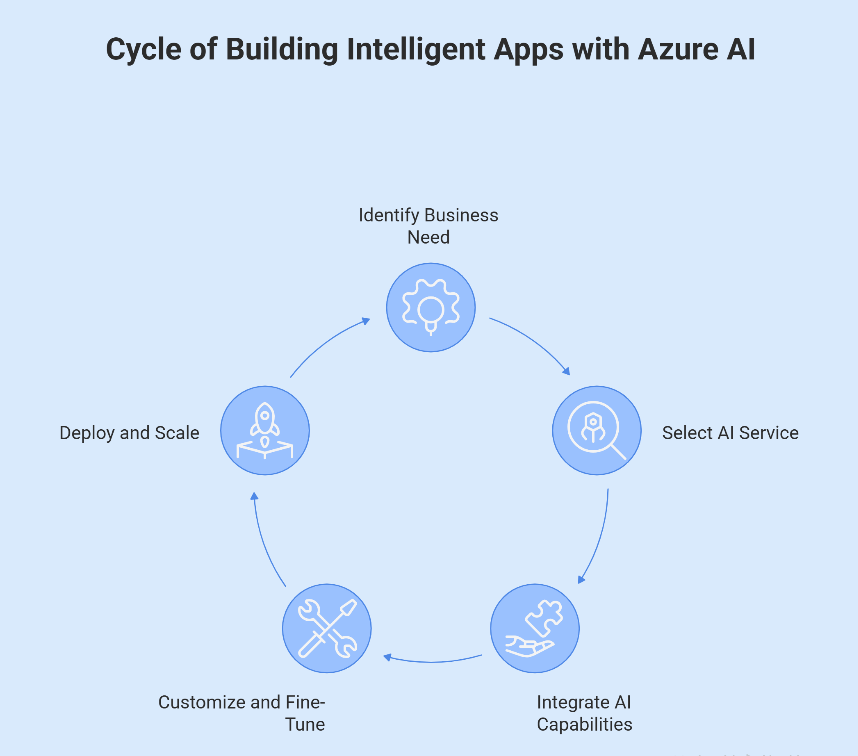
1. Identify the Business Need
Companies need to consider specific areas of AI where the technology will unlock real value for them. A business must evaluate the current state of its operations and the bottlenecks that AI interventions could alleviate. Define the most common use cases for AI in industry, such as automated customer interactions via chatbots, personalized recommendations, document analysis at a very large scale, or having insights drawn from customer feedback. To avoid surprises, a well-defined impact measurement focused on the problem ensures that there is an aligned investment.
2. Select the Appropriate Azure AI Service
The very next practical step is choosing the right Azure AI service based on functionality as soon as one has a clear understanding of the given case:
- Vision services: They train applications on how to analyze images and videos. These services can detect objects, recognize faces, and help by extracting text using OCR. The actual use case for such services is security, quality control, and document processing.
- Speech services: They provide a way for an application to quickly convert speech to text and produce natural-sounding speech. Such services are extensively utilized for voice-controlled commands, TTS, meeting transcripts, and closed captioning.
- Language services: They enable the application to perform various text-related tasks: understanding, analyzing, and creating text. Such services include sentiment analysis, language translation, intent detection, entity recognition, and the like.
- Decision services: They handle automated decision-making that captures any anomalies, quarantines inbound content, or picks up strange patterns from data.
- Search services: They empower smart search agents for the retrieval of information, enabling users to rapidly find the relevant information from a large corpus.
Selection of the correct set of services ensures optimum performance while retaining simplicity in its deployment.
3. Integrate AI Capabilities Using APIs
Microsoft Cognitive Services have been designed for faster and more straightforward integration with developers. To access these services, developers would simply need to connect to its RESTful APIs or SDKs, written in various programming languages. In the end, they will be able to integrate AI services directly into their own applications, without requiring data science or model training expertise. Additional developer tools and explicit documentation tend to make the process of integration even more straightforward.
4. Customize and Fine-Tune When Needed
Despite deploying Microsoft Cognitive Services that deliver sound performance to enhance efficacy, business performance can be amplified when the services are customized based on their data. It is particularly relevant for industry-specific scenarios or when there are special requirements. These specifications help AI models better understand unique terminologies, images, or patterns, resulting in more relevance and precision. Furthermore, these scenarios could become even more enhanced while leveraging Microsoft’s Machine Learning and generative AI.
5. Deploy and Scale on Azure
Once the project is completed, the application is deployed on Azure’s cloud infrastructure. Azure has all the features needed for scalability, security, performance optimization, and compliance, which allows applications to scale along with online load effortlessly. Such a cloud-reliant solution avoids replication of complex infrastructure issues and ensures enterprise-grade reliability.
Conclusion
To sum up, using Azure AI to build intelligent applications is an achievable and practical task. By identifying the correct business needs, selecting the appropriate AI service, integrating these API services, possibly modifying those services when necessary, launching on a scalable cloud platform, and coding their way into specific, custom solutions, companies may quickly produce viable AI-engineered arrangements bringing innovation and enhancing user experiences.
If you are looking to build scalable apps with Microsoft Cognitive Services, you can visit us here.
Frequently Asked Questions
Q1. What are the benefits of using Microsoft Cognitive Services?
Microsoft Cognitive Services are designed to be used via APIs and allow instant AI integration into all projects, saving massive amounts of development costs and time due to their pre-built models, such as vision, speech, language, and decision-making aids that help any app see, listen, speak, and understand without any deep data science expertise. Major advantages include improved user experiences (making interactions more intuitive). Additionally, with your data, flexible customization options, and applications deployed on the secure Azure platform, businesses can reduce development time and effort
Q2. Which Azure cognitive services can you use to build conversational AI solutions?
Azure AI Bot Service gives a dedicated IDE for bot crafting. It is interoperable with Microsoft Copilot Studio, a fully hosted low-code platform, making it easy for developers at any level of technical prowess to create conversational AI bots without coding.
Q3. How does Microsoft approach the integration of artificial intelligence (AI) in its operations and services?
While other AI technology developers offer discrete tools for embedding intelligence, Microsoft’s focus is to develop game-changing enterprise applications by embedding real AI. You hardly notice where it starts when you are directed towards the integration of very elaborate customer service models, structured data, or automated processes, next to their sheer vision.
Q4. Is Azure Cognitive Services the same as Azure AI Services?
Microsoft Azure now offers AI services such as Cognitive Services, Azure Machine Learning (AML), and Azure Cognitive Search.
Q5. What are the 4 types of AI?
AI falls into four basic categories based on the degree of complexity and sophistication it carries: Reactive Machines, Limited Memory AI, Theory of Mind AI, and Self-Aware AI. Reactive machines do not retrieve past information (like those used by Deep Blue for chess); Limited Memory AI operationalizes that, where previous experiences are learned from to make decisions (like in self-driving cars); these are also theoretical AI types and not part of Microsoft Cognitive Services offerings.
Q6. What are Microsoft Cognitive Services APIs?
Microsoft Cognitive Services APIs are developed and tailored for developers to access AI-based capabilities such as vision, speech, language understanding, and decision-making within applications without building AI models from scratch.
Q7. What types of Microsoft AI services are available for businesses?
This service will make it possible for businesses to build intelligent, responsive applications that will make use of computer vision, Natural Language Processing, translation, and search services in order to analyze images and videos at a high level, recognize speech, and understand text.
Q8. Why are Cloud-based AI services important for modern applications?
The scalability, availability, and security of Cloud-based AI services suit enterprise-grade purposes. They will help APIs bear the extra load of an ever-growing number of requests per minute.
Q9. How does cognitive computing improve application functionality?
Cognitive computing allows applications to interpret human language, understand speech, and analyze visual content. It has led to applications that understand language interactions more naturally and can automate whole business processes more intelligently.
Q10. What are speech recognition services used for?
Speech recognition services convert spoken language into text for interaction via voice commands. It finds common applicability for meeting transcription, voice commands, subtitles, and accessibility solutions.
Table of Contents
Schedule A Free Call Now !
Fill Out the Form and Our Experts Will Contact You Within 24 Hrs
Recent Posts
- Why Your AWS Bill Increased After Migration (And How to Fix It Fast)
- Best AWS Cloud Management Tools to Simplify Cloud Operations
- AWS Consulting Partner vs In-House Cloud Teams: What Businesses Should Consider
- AWS Migration Checklist: What Businesses Should Prepare Before Migrating Applications
- Key DevOps Best Practices for Applications Running on AWS