What is Blue-Green Deployment? A 2026 Guide to Zero-Downtime Releases

A blue-green deployment is a strategy for releasing software that aims to eliminate downtime and minimize the risk involved in a new release by operating two identical production environments at the same time. The blue environment hosts the existing version of the application, while the green one holds the upcoming version. Only one environment at a time is processing real user requests, while the other one is inactive.
In a typical blue and green deployment, the blue environment is still in use and receives traffic until the new version is deployed and tested in the green environment. The green environment is identical to blue but is kept separate from active traffic flow until fully tested. After everything is confirmed to be working as expected, users are gradually and smoothly switched to the green environment, which helps ensure a reliable and trouble-free release.
To implement this strategy effectively, you can hire Azure DevOps engineers who specialize in managing complex deployment pipelines.
Let’s take a closer look at this topic in this post.
Table of Contents
What Are the Benefits of Blue-Green Deployments?
Blue and green deployments lower the likelihood of downtime during the release of new versions significantly, and this is because they keep two identical production environments alive. One environment is serving the users, and the other one is used for testing, validating, or supporting the first one. The approach that this method includes not only allows for smoother deployments but also increases the usage of the infrastructure, which is generally only meant for staging more efficiently.
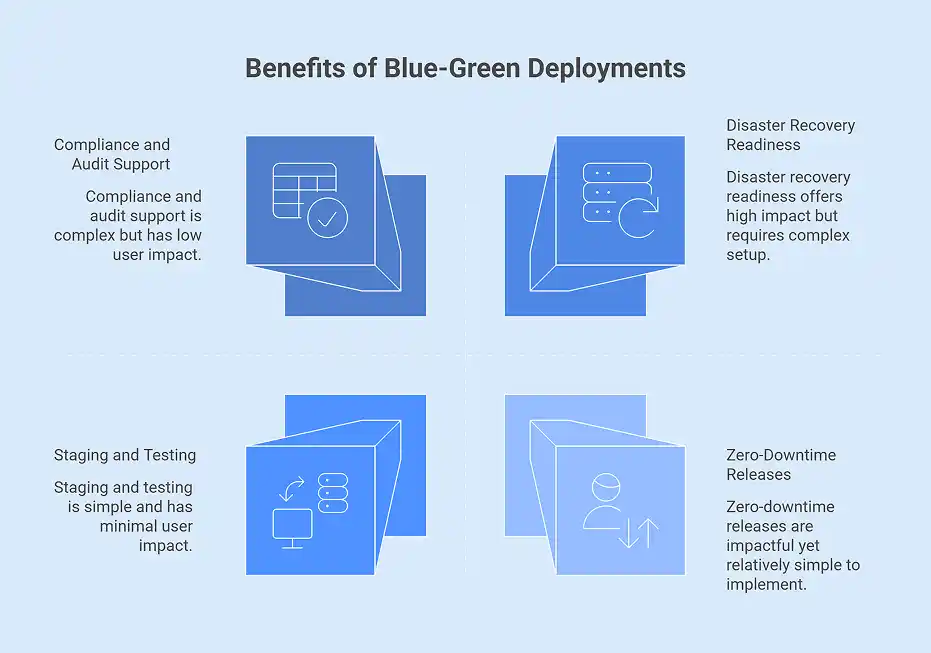
Staging and Testing
The idle environment becomes the staging area for the next release as soon as the environment that was active becomes the main one. Teams can deploy, test, and validate the new changes in a production-like environment that does not affect real users, thus ensuring that there is higher release confidence.
Easy Rollback
In case of any problems occurring after the switch of traffic to the new version, the rollback is quick and reliable. This is because the previous version is still running in the other environment, so the traffic can be redirected immediately, thus the impact and recovery time are reduced.
Disaster Recovery Readiness
When a release becomes stable, then deploying it to both environments is like creating a fully operational backup environment. This means that an entire backup is always at hand, thus the disaster recovery potential is increased.
Zero-Downtime Releases
Blue and Green Deployments allow continuous updates without service interruptions for those companies that demand constant availability. In effect, major releases do not disturb users’ access at all.
Performance Benchmarking
The non-production environment can be the one for performing the load and performance testing on new releases. It means that the teams can optimize performance and spot the bottlenecks ahead of the application going live.
Compliance and Audit Support
In the case of heavily regulated industries, the transparency of the deployment process and reversibility are of utmost importance. The blue and green deployment method allows for easy rollback and clear version control, thereby providing the desired level of deployment management.
Read More: When Should Businesses Hire DevOps Engineers for Cloud-Scale Delivery?
How Does Blue-Green Deployment Ensure Zero Downtime?
Blue-green deployment allows the use of two identical environments to provide continuous availability without interruption. The blue environment is where the current stable version is hosted, while in the green environment, the new version is released. The updates are made in the green environment, and then the updating of users is only done at the last moment when the new version is validated completely.
Two Identical Environments
The method maintains two production environments of similar characteristics. Blue is the environment that handles user transactions, while green is the one that is set up and resourced similarly to blue, and hence can safely support testing of the new version.
Deploy and Test in Isolation
The new version of the application is set up in the green environment and is subjected to independent testing. Since at this stage, green does not have any actual user traffic, teams can check functionality and performance without the risk of the business losing customers.
Instant Traffic Switch
As soon as testing is done, a load balancer or DNS routing is used to reroute user traffic from blue to green. The transition takes place immediately, making the release invisible to the end of users.
Zero Downtime Experience
Since the two environments were and are identical and running, no disruption of service is felt by the users during the transition from blue to green.
Instant Rollback Capability
In the event of any issues being identified post-switch, user traffic can be rerouted back to the blue environment immediately. This gives the company a quick and efficient rollback solution, which in turn ensures that the system remains stable.
Achieve Zero Downtime with Blue-Green Deployment

Managing Database Schema Migrations In Blue-Green Environments
Handling schema changes, in particular in a blue-green arrangement, necessarily requires separating database updates from app deliveries and ensuring all schema updates are fully compatible with the versions of apps that are already deployed; this will, in turn, mean you spend less time doing this than you would have to do before.
Being Shared
The blue and green environments are mostly connected to the same database for most blue-green deployments. Trying to create, synchronize, and indeed maintain two production databases in production, possibly in real time, is fraught with complex situations to address. Therefore, maintaining one database could make consistency and administration possible.
Ensuring Backward Compatibility in Database Updates
All database updates should be compatible with the old version. Schema changes should, therefore, not result in disrupting the blue environment such that both application versions work properly during changes.
Migration of Decoupled and automated enhancements
In agile contexts, database changes are processed independently before the deployment of the application. Version control-oriented migration tools like Liquibase or Flyway automate schema upgrades, ensure consistency, and lessen errors that manual interventions might bring.
Step-by-Step Strategy for Renaming a Column
For a disruptive change like renaming a database column from ZIP_CODE to POSTAL_CODE to take place without any downtime, a gradual and meticulously planned rollout is necessary. This phased approach guarantees uninterrupted service and safe transitions between application versions.
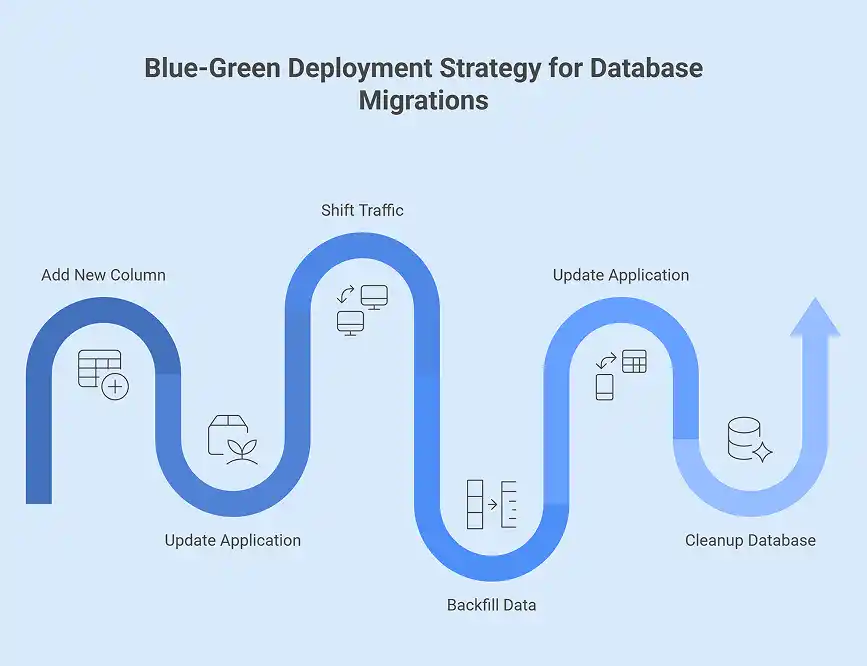
Database Update: Addition of the New Column
The first step is to add a new column called POSTAL_CODE while the old ZIP_CODE column is still present. This makes it possible for both versions of the application to run without any disruption.
Application Update: Simultaneous Read and Write Logic
The new version of the application is installed in the green environment. This version can read from the existing ZIP_CODE column and write to both ZIP_CODE and POSTAL_CODE. At the same time, the blue environment is still functioning with only the original column.
Traffic Shifting
After the green version of the application is validated, all user traffic is moved to the green environment. The blue environment is no longer active use but is still available as a backup.
Data Backfill
Then there is a controlled data migration that takes place to transfer all the existing values from ZIP_CODE to POSTAL_CODE. This ensures that both columns have consistent historical and new data.
Application Update: Using One Column Only
The application is then updated again to use only the POSTAL_CODE column. This version is ready to be installed in the previously occupied environment, thus completing the transition.
Database Cleanup
When it is confirmed that there is no application using the ZIP_CODE column any longer, the old column is deleted from the database. By now, the schema change has been fully implemented with no downtime involved.
Can You Do a Blue-Green Deployment in Kubernetes?
It is already popular among many development teams to use Kubernetes to build, patch, test, and run applications in the production environment. As a result, deploying Kubernetes is indeed simple, and Kubernetes is known to help in automating a blue-green release strategy, but it does not support blue and green deployments by default.
The Deployment object in Kubernetes undertakes rolling updates to enable seamless updates to applications with no downtime by gradually replacing old pods with new ones. This kind of mode is similar to blue and green deployment, but it will not provide every feature provided by blue-green implementations. Rollbacks are complex, and the update takes longer to accomplish, as opposed to an actual blue-green deployment, where you switch from one environment to the other in a single step.
Some approaches will enable blue-green deployment in Kubernetes by making use of other tools and strategies. One technique which has by now become a commonly used solution is Argo Rollouts. Argo Rollouts is a Kubernetes operator that is deployed in Kubernetes and extends Kubernetes features in terms of rollouts, blue-green, and other advanced progressive delivery strategies.
Automating Blue-Green Deployments with Bloom
In the Bloom setup, blue-green deployment involves setting up two environments: one blue and the other green. Rather than segregating each one into its own phase, both blue and green can remain part of the same production phase. Essentially, this setup is configured to check which software version is running through each environment and determine whether new releases are to be installed in the blue or green zone within the deployment.
Conclusion
Blue-green deployment is a powerful strategy for achieving zero-downtime deployment, reducing deployment risks, and ensuring application reliability. By maintaining two identical environments, teams can safely test new versions, instantly switch traffic, and quickly roll back if needed. Whether managing database migrations, deploying in Kubernetes with Argo Rollouts and other such tools, or automating releases using tools like Spinnaker, these deployments ensure flexibility, transparency, and control. As one of the ideal models for achieving high availability, it helps ensure smooth upgrades and operational confidence.
Contact us today to learn how we can help you implement blue-green deployment effectively!
Frequently Asked Questions
Q1. Is blue-green deployment more expensive than rolling updates?
Yes, blue-green deployment generally costs more than rolling updates in that it calls for two identical production environments (blue for the live environment and green for the deploying one) to be put in operation in parallel, and hence have resource consumption and infrastructure costs double during deployment when probably one environment just recycles the old instances incrementally, utilizing the remaining resources more efficiently.
Q2. When to choose blue-green deployment for mission-critical apps?
If a mission-critical application requires zero downtime, rollback capability, and exhaustive testing in an environment identical to production, blue-green deployment is the best process to use because it allows such activities to be done with confidence.
Q3. What are the benefits of using Argo Rollouts for automated Kubernetes blue-green releases?
Argo Rollouts considerably reduces procedural complexity required in implementing a version of the blue-green deployment strategy, plus it furnishes an automated, controlled, safer choice for deployment that can automatically roll things back but still keep zero downtime for updates, supervise as well as code towards preview environments, do monitoring and health checking effortlessly by means of integrated metrics, and deal with traffic very sensibly by means of Service/Ingress management and, in turn, thus surpass Deployment provision in fact with a wider credit of best shipping methods, such as those leveraged by excellent CI/CD software for GitOps.
Q4. What is continuous deployment?
Continuous Deployment is a DevOps practice that entails automatically deploying every code change that can pass automated tests to production. This practice reduces the time taken for deployment of features and fixes, omitting many manual steps.
Q5. How do DevOps deployment strategies improve software releases?
Structured deployment approaches, speedy rollback arrangements in the face of problems, and solution maintenance throughout deployment to ensure high availability for deployments are all addressed.
Q6. Why should a company hire Azure DevOps engineers?
Azure DevOps Engineers work with organizations to bring about DevOps practices with Microsoft Azure. This embraces CI/CD pipeline optimization, delivery automation streams, and scalable, secure, and efficient features for the organization.
Q7. What are the benefits of cloud-native deployments?
Benefits include more efficient scalability, superior redundancy, more effective use of resources, and the possibility of adopting DevOps aspects of continuous integration and delivery.
Q8. What is microservices deployment?
Microservices deployment refers to the release of discrete and independently deployable services encapsulating a larger application. Each microservice can be updated, scaled, or rolled back without affecting the system as a whole.
Q9. What is Kubernetes blue-green deployment?
Kubernetes blue-green deployment is a strategy to release new application versions with zero downtime. Two identical environments—blue (current version) and green (new version), are maintained. Traffic is switched from blue to green only after the new version is fully tested and validated.
Q10. How do you switch traffic between blue and green environments in Kubernetes?
Traffic is usually switched using a load balancer, service routing, or DNS updates. The switch is instantaneous, ensuring users only access the stable version of the application.
Q11. Is blue-green deployment suitable for microservices in Kubernetes?
Yes, blue-green deployment works well with microservices. Each service can have its own blue and green instances, allowing independent updates and testing without impacting the rest of the application.
Q12. What challenges should teams consider when using blue-green deployment in Kubernetes?
Challenges include managing shared databases, handling large-scale stateful applications, resource duplication (running two environments), and ensuring both environments stay synchronized during updates.


Recent Posts
- Azure Cloud Architecture Explained: A Simple Guide for Enterprises
- CI/CD Pipeline Setup in Azure: Best Practices for 2026
- DevOps vs DevSecOps: What’s the Difference?
- Hire Azure DevOps Developers Who Deliver Faster, Secure CI/CD Pipelines
- Azure Virtual Machines vs Containers: What’s Right for Your Infrastructure?