Top 7 AI Tools for Web Development in 2026

The web world is undergoing a significant transformation with the advent of AI. The AI technology is automating workflows, processing data faster, providing real-time insights, and upgrading user experience every now and then. Hence, AI tools for web development and web app development are changing the way websites are built, tested, and maintained. They improve efficiency and make website development more intuitive. This remarkable shift explains how AI is changing web development by providing developers with smarter assistance, enhanced decision-making, and more creative freedom.
In this blog, we will study the top 7 AI tools for website creation that will be shaping 2026. This will help us understand how these smart tools are empowering the way websites are built today.
What are AI tools for web development?
AI tools for web development are curated software packages that use machine learning, large language models (LLMs), and automation. This makes it easier for developers to build, design, improve, and manage websites.
These AI development tools improve efficiency and save time spent on manual work, such as designing, evaluating performance, writing code, and even supporting advanced processes like AI / ML testing to ensure intelligent applications perform reliably at scale.
7 Top AI tools for web development in 2026
Web development AI tools 2026 are about offering developers and product teams the capacity to turn ideas into experiences that are ready for production. Using these tools speeds up the process and delivers results more accurately. Here are the top 7 AI tools for web development.
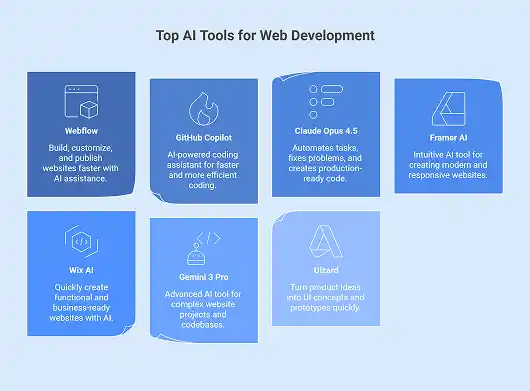
Webflow
Webflow allows developers to construct, customize, and publish websites faster with an abundance of options. You can change the layout of your theme in Webflow or use a pre-made design and quickly change things like colors, fonts, buttons, and layouts. Its embedded AI Assistant takes AI-powered web development to the next level by helping you change current sections, add new ones, and make whole pages that fit perfectly with your design, brand language, and tone. The Starter plan lets developers try out different things without any restrictions. When you are ready to publish, host, and scale, you can switch to a full design experience. This makes Webflow a great choice among modern AI tools for web development.
GitHub Copilot
GitHub Copilot is one of the commendable AI tools for web development in 2026. It was made to make coding faster and more efficient. It acts as an AI-powered coding assistant, helping developers with repetitive tasks, building complex code, and simplifying pull requests right in their Integrated Development Environment (IDE). It can do multi-step coding activities, code summaries, and speed up the modernization of Java and .NET apps in agent mode. Copilot works with Azure Boards, Microsoft Teams, JIRA, and Slack to make workflows more efficient. It automates common coding tasks, freeing coders to work on new ideas, design, and optimization. AI website builders are leveraging GitHub Copilot to upgrade the process by which modern websites are built and run.
Claude Opus 4.5
Claude Opus 4.5 is becoming one of the leading AI tools for web development in 2026 since it makes developers work faster and automates many of their tasks. It effectively manages complicated coding, fixes problems that affect multiple systems, and creates accurate, production-ready code with little human intervention. As one of the best AI tools that speed up web development, it handles multi-agent workflows, optimizes logic, and eliminates unnecessary stages. This lets developers focus on high-value activities like architecture, performance, and innovation. Opus 4.5 is highly regarded since it can fix problems that are almost impossible for older models. It consists of better reasoning, vision, and math skills.
Framer AI
Framer is one of the most intuitive AI tools for web development, helping designers and developers make modern websites. You may use the built-in AI assistant in Framer to make responsive landing pages, personal portfolios, resume pages, and other basic layouts. The AI assistant helps you with the site structure, initial material, and design ideas. But you need to change the features, styles, and interactions to finish it. You can create advanced components like tabs, cookie banners, and visual effects without scripting because of the built-in Workshop. AI Translate and AI Plugins are two further capabilities that help you change the language of your material, make graphics, rewrite text, and add alt text. Framer is one of the best AI tools for building modern websites. It lets you create websites aesthetically with complete AI support.
Wix AI
Wix AI is another competitive addition among the AI tools for web development. It lets businesses make completely functional and business-ready websites in only a few minutes. You can turn your ideas into unique websites with layouts, content, and built-in capabilities like scheduling, online storefronts, and event management just by talking to their AI assistant. This lets you keep improving the design, text, themes, and structure to meet your expectations. Wix makes things a lot easier by using AI to help with writing, making images, and creating sections right away. This is considered one of the easiest to use developer productivity tools. It helps teams launch websites faster while ensuring control, scalability, and performance.
Gemini 3 Pro
In 2026, Gemini 3 Pro is regarded as one of the most advanced AI tools for web development. It is designed to cope with current, agent-driven workflows and complex website projects. It excels in creating, restructuring, and maintaining huge codebases. This makes it a great tool for designing web apps that can scale with time. It can plan multi-step actions, debug across long contexts, and interact with files, frameworks, and entire codebases in a precise way. It identifies problems, recommends solutions, and makes code more reliable over development cycles, making it one of the best AI debugging tools. Gemini 3 Pro makes it easy for developers to go from idea to production quickly since it works well with common IDEs, APIs, and development platforms.
Uizard
Uizard is another powerful addition in place of the best AI tools for web developers since it can turn product ideas into working UI concepts in a few minutes. As one of the user-friendly AI tools for web development, it lets teams make wireframes, multi-screen prototypes, and editable designs with only a few text instructions. Screenshot and wireframe scanners are two features that turn pictures or hand-drawn sketches into digital mockups right away. This speeds up the process of iterating and working together. It is highly regarded for quick and scalable website development in the modern context because it uses AI to modify components, create themes, and collaborate in real time. This helps to get rid of design bottlenecks and connects ideas with action.
These tools suggest that artificial intelligence in web development is introducing a dynamic shift in the way websites are planned, created, and improved. With these incredible AI tools for web development, teams enjoy the flexibility to deliver digital experiences that are faster, more accurate, and innovative.
Read More : AI in Web Development
Conclusion
Leveraging AI tools for web development gives a competitive edge to developers and product teams as a whole. AI tools change the way websites are created, tweaked, and used. This helps teams deliver improved digital experiences across various touchpoints. These tools automate repetitive activities, save time, and eliminate the hassle of complex coding. This further helps teams in trying out new ideas, improving the user interface, and making better business decisions. Hence, using smart solutions is no longer a choice; it’s a necessity to gain a strategic advantage as the digital world continuously evolves. Teams that embrace these AI tools will be able to grow faster and adapt to change with confidence.
The future of AI in web development emphasizes effective solutions, smarter teamwork, faster innovation, and connected web experiences.
Do you want to know how AI will change web development in 2026? Bloom helps you turn AI tools into scalable solutions. Let’s talk!
Frequently Asked Questions
Q1. What are AI tools for web development?
AI tools for web development are software packages that use machine learning, LLMs, and automation. These tools help you write code, fix errors, test things, and make content. They help developers find bugs, test websites more quickly, and make digital experiences smarter and more connected.
Q2. How can AI help in web development?
More businesses are using AI tools for web development to make it easier to build websites. These tools assist in making websites that are free of errors, work well, and meet business goals from the beginning of the design process to the end of testing and deployment. AI web development tools make work more efficient by getting rid of unnecessary stages and eliminating chances of errors. These tools also foster creativity by letting teams focus on new ideas and providing smarter and more connected digital experiences.
Q3. How is AI transforming web development?
Tools like GitHub Copilot, Wix AI, etc., assist in making coding faster, improving design elements, and making the whole user experience better. They cut down on mistakes, automate repetitive activities, and let developers make websites that are smarter, more connected, and easier to use. By using AI tools for web development, teams can create websites faster while ensuring superior quality.
Q4. How can AI help a software development company?
AI tools for web development can easily integrate with a software development company’s current architecture that includes IDEs, version control systems, and CI/CD pipelines. These tools provide features, make workflows easier, improve debugging, and boost productivity across the development lifecycle by allowing access to APIs and plugins.
Q5. What are the top AI coding tools?
GitHub Copilot, Microsoft Copilot, ChatGPT, etc., are some of the best AI coding tools. These tools help developers by producing code snippets, giving insights in real time, detecting errors, and speeding up the entire process.
Q6. How AI coding tools are transforming software development?
AI coding tools are changing the way software is developed. They make it easier to write code, increase productivity, and make code quality better. They enable developers to automate processes that need to be done repeatedly, find and resolve issues more quickly, and make complicated workflows easier. This helps teams stay focused on delivering better experiences.
Q7. What is the best AI tool for developers?
There is no one best choice because different teams and projects have individual needs. The best AI coding tools for developers depend on many factors. They depend on how well they work with existing IDEs, how many languages they support, how they can fix errors, and how well they fit into the developer’s workflow. GitHub Copilot, Microsoft Copilot, Gemini 3 pro, etc., are some of the tools mostly preferred by developers.
Q8. What is the future of AI in web development?
The future scope of AI in web development will be focused on faster, more accurate, and smarter automation. AI will take care of tasks that are prone to mistakes, such as writing code, testing it, fixing bugs, and making it run faster. This lets developers focus more on architecture, creativity, and user experience while making web apps run faster.
Q9. Why do developers need productivity tools?
Developers use productivity tools like AI to better handle their expanding workloads. These tools take care of tasks that need to be done repeatedly, cut down on manual work, and eliminate chances of errors. This lets teams focus on reasoning, creativity, and problem-solving aspects. Productivity tools also help teams work together smoothly and deliver work faster.


Recent Posts
- Azure API Management: What Is It and How Does It Work?
- How Businesses Design Custom AI Solutions to Solve Complex Operational Challenges?
- How to Choose the Right AI Solutions Provider for your Company?
- Stop Paying for Logs You Don’t Use: The SaaS Guide to Smarter Azure Monitoring Services
- Top 7 AI Tools for Web Development in 2026