Azure Migration Strategy: A Step-by-Step Guide for Enterprises Moving to the Cloud

An Azure Migration Strategy helps businesses move workloads to the cloud easily with the support of Azure Migration Services. It starts with making a complete list of all the applications, data, and infrastructure, and then figuring out how each workload should change in Azure. With this, businesses have less uncertainty and risk when they have a clear plan for moving. This makes them confident throughout the Azure migration process. Instead of just being a simple technical task, it connects cloud adoption to business goals. This helps businesses grow quickly, stay up to date, and avoid making mistakes.
Even though every business’s path to Azure migration is different, the reason to plan the migration process remains almost the same. We will learn about the Azure Migration Strategy here, along with a step-by-step guide for businesses moving to the cloud. This will help you decide where to start, what to focus on, and how to turn your plans into action.
Table of Contents
Why should you migrate to Microsoft Azure?
The first step in moving to Microsoft Azure is to fully understand why you actually want to do it. This clarity is the basis for a good cloud migration strategy and ensures that every choice helps the organization fulfill its long-term plans.
1. Find the main reasons to migrate
Companies often choose the Azure Migration Strategy to update their old infrastructure and make it more secure. They also opt for migration if their data center contracts are about to expire. Azure also lets organizations grow their resources based on demand and encourages new ideas through automation, analytics, and AI capabilities.
2. Set Clear Business Goals
Early on in the process, clear reasons for doing anything should be about achieving measurable goals. These goals guide the Azure migration strategy and help teams stay focused on results like reducing costs, improving performance, and speeding up development cycles.
3. Check the readiness of skills and resources
A lot of businesses don’t have enough IT resources or skills. Azure migration strategy makes it easier to manage on-premises infrastructure by offering centralized monitoring, automation, backup facilities, etc. This allows teams to focus on strategic goals while also making operations more efficient. This also leads to Azure cost optimization.
What are the common Azure migration challenges?
Building an organized Azure Migration Strategy largely depends on addressing the challenges that enterprises face when moving to the Azure cloud. The common challenges are –
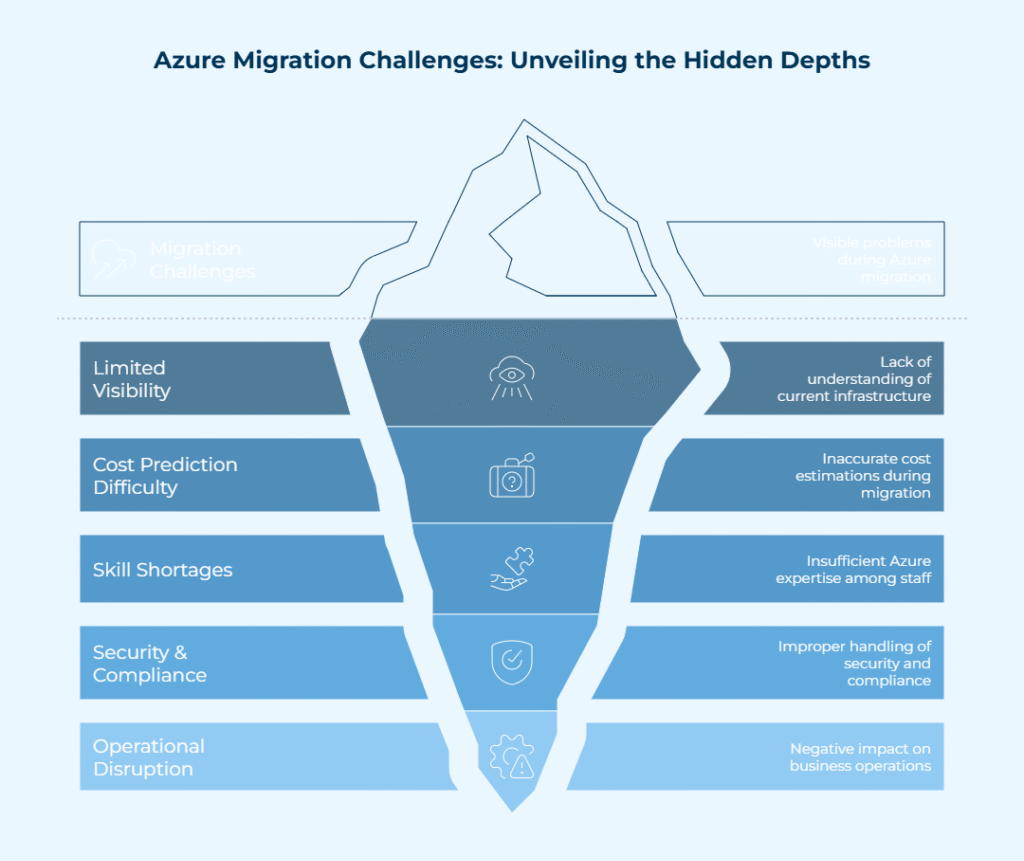
- Limited visibility into current applications and infrastructure is a common problem with an Azure Migration Strategy. If you don’t fully understand workloads and dependencies, moving to the Azure cloud can cause performance problems or downtime.
- Another common problem during Azure cloud migration is that costs are hard to predict. When migrations aren’t aligned with a well-defined Azure Migration Strategy, inaccurate resource sizing, lack of oversight, and unequal usage patterns contribute to paying more than planned.
- There are also skill shortages that make moving to the Azure cloud difficult. A lot of companies don’t have enough staff who are knowledgeable about Azure architecture, security, and operations. This can slow things down and make the setup wrong.
- Security and compliance issues are a big problem for any Azure Migration Strategy. If you don’t handle identities, access controls, or data policies properly during Azure cloud migration, you could put important workloads at risk and make it harder to follow the rules.
- Another problem arises when operations get disrupted. When moving to the Azure cloud, poor workloads, minimal testing, or tight deadlines can affect business consistency.
Recognizing these problems early helps businesses come up with a realistic Azure Migration Strategy and set the correct expectations for a successful move to the Azure cloud. This will also help enterprises get the most out of Azure migration services. Turn cloud migration hurdles into potential business benefits with a step-by-step approach!
Also Read: Top 5 Mistakes to Avoid During Azure Migration Services
The step-by-step Azure migration guide
A proper Azure Migration Strategy makes sure that moving to the cloud is well-organized, involves less risk, and is prompt. This step-by-step guidance includes the important steps in the Azure conversion process and points out factors that businesses of all sizes should consider.
1. Planning and assessing workloads before migration
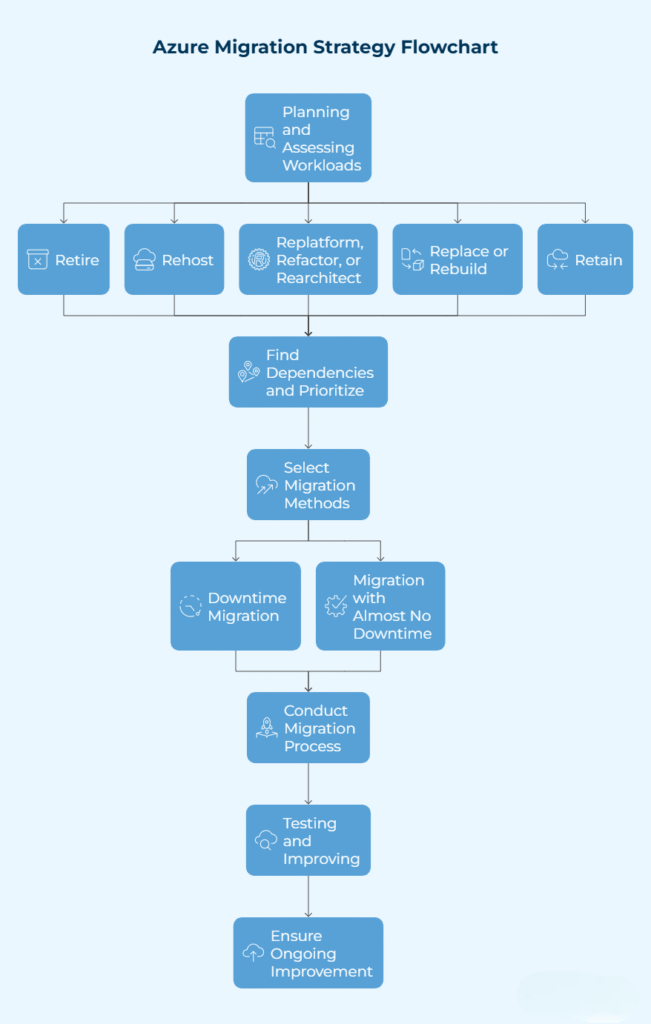
The first step in making a good Azure Migration Strategy is to look at your workloads and choose the best way to handle each one.
- Retire: Stop using workloads that are no longer needed, are not being used enough, or are not needed at all. Before retiring workloads, be sure there are no important dependencies.
- Rehost: Move stable workloads to Azure with a few changes for a quick and less risky move. Don’t shift workloads that need to be updated to avoid carrying technical debt.
- Replatform, Refactor, or Rearchitect: Improve the scalability and dependability of workloads by optimizing code, changing architecture, or moving to PaaS.
- Replace or Rebuild: Use SaaS to replace old systems or rebuild workloads to make them more efficient in the cloud.
- Retain: This is about putting workloads on-premises when migration isn’t possible because of compliance, technical, or business reasons.
This first step makes sure that the migration plan is in line with your company’s objectives and sets the stage for a defined Azure migration roadmap.
2. Find out what has to be done and put the important things in order
Mapping dependencies is an important part of any Azure Migration Strategy.
- Find out what technical, operational, and business dependencies you have so that the move doesn’t cause any problems.
- Group workloads into waves, starting with less important systems to build confidence before migrating important apps.
- If workloads can’t move right away, plan for hybrid environments.
Ranking workloads in this way makes sure that the Azure migration strategy keeps operations going and avoids downtime. This is especially crucial for an Azure migration strategy for large ,dealing with complex IT environments.
Plan Your Azure Migration with Specialists

3. Select the Right Ways to Move
For an Azure Migration Strategy to work, it’s important to choose the right path.
- Downtime migration: This works for workloads that aren’t very important and can deal with short outages.
- Migration with almost no downtime: This is important for core systems and apps that need to keep running.
Azure Migrate and Azure Data Migration Service (DMS) are two tools that can help make the Azure transfer process go more smoothly by automating tasks, tracking progress in real time, and checking for errors.
4. Conduct the migration process in Steps
A phased process is the most important part of a scalable Azure Migration Strategy.
- To verify the migration process and make sure the configurations are correct, start with workloads that aren’t in production yet (like development, staging, and QA).
- Move important workloads only after making sure everything is ready, which lowers the likelihood of problems.
- Keep an eye on progress all the time, using Azure migration services to automate, control, and ensure compliance.
This staggered execution highlights the best practices for Azure cloud migration by lowering the chances of mistakes and ensuring that the migration is in line with your business goals.
5. Testing and improving after migration
A whole Azure Migration Strategy includes checking and improving things after the move.
- To make sure that workloads work correctly in Azure, you should verify their functionality, integration, performance, and security.
- Use Azure cost optimization methods to make sure resources are properly sized, cut down on waste, and make operations run more smoothly.
- Keep everyone on the same page by documenting the outcomes, updating the Azure migration checklist for enterprises, and talking to stakeholders to ensure better visibility.
This step also gives you a chance to update your workloads even more and make sure that your cloud migration plan will be good for your organization in the long run.
6. Ensure Ongoing Improvement
A completely successful Azure Migration Strategy emphasizes continuous optimization and governance, even after workloads have been moved.
- To keep Azure expenses as low as possible, check the performance and costs of your workloads frequently.
- Look at workloads repeatedly to see if there are any requirements to upgrade them by refactoring, rearchitecting, or using SaaS solutions.
- As your company grows and new possibilities arise, make sure to keep the Azure migration roadmap up to date.
A strong plan makes sure that your business can expand, come up with innovative ideas, and keep Azure secure and efficient.
This step-by-step guide makes it apparent how to migrate enterprise workloads to Azure with fewer errors, risk, more control over expenses, and the most predictable outcomes.
Conclusion
A clear Azure migration strategy that lines up with business requirements, goals, workflows, and long-term growth plans is the first step to a successful move to Azure. As of 2025, the Azure cloud platform has more than 5,379 AI and ML services and products. These are immensely valuable for various industries like healthcare, finance, retail, etc. With an organized migration plan, enterprises can lower risk and achieve better results by knowing what problems they might face. A well-defined Azure migration checklist for enterprises makes sure that the planning and execution are thorough. This allows businesses to move to Azure confidently and efficiently.
Are you ready to put your Azure migration plan into action? Bloom can help you plan and carry out your Azure migration strategy. Connect now!
Frequently Asked Questions
Q1. What is Azure Migrate?
Ans: Azure Migrate is a cloud service that helps companies move their apps, databases, and workloads from their own infrastructure to Azure. It makes the process of moving easier, cuts down on downtime, and makes sure that a planned approach is used.
Q2. What are the benefits of Azure migrate?
Ans: Azure Migrate makes moving workloads to Azure easier by providing readiness assessments, cost estimates, automation, and built-in tools. It helps with mass-scale migrations, makes the best use of resources, and ensures that cloud adoption is quick and cheap.
Q3. What services does Azure migrate provide?
Ans: Azure Migrate has tools for finding and evaluating servers, apps, and databases. It also has readiness reports for migration, cost estimates for Azure cost optimization, and integration with Azure Site Recovery and Database Migration Service. Apart from this, it automates tasks, provides you with a single dashboard to keep track of your progress, and makes mass-scale migration processes smooth.
Q4. What makes a successful Azure migration strategy?
Ans: To make a successful Azure migration strategy, you need to do a lot of research, planning, set priorities for workloads, select the best migration methods, and make the most of your resources. Clear communication with stakeholders, seeking guidance, ongoing monitoring, and validation after the migration helps make the move to Azure smooth.
Q5. What are Azure cloud migration best practices?
Ans: The best practices for Azure cloud migration are planning, seeking expert guidance, prioritizing security and doing it in stages. Before moving, businesses should check workloads and dependencies, test migrations in non-production environments, and test performance.
Q6. Should you migrate to Azure?
Ans: You can migrate to Azure if you want to scale, become resilient, and have access to sophisticated cloud machinery. Azure can handle a wide range of workloads, adhere to compliance guidelines, and offer flexible migration paths. With this, you can lower costs, make things easier, and speed up the adoption of cloud computing.
Q7. What is Azure migration checklist?
Ans: An Azure migration checklist provides the most important conditions you need to make a successful move to the cloud. Setting business goals, figuring out workloads, estimating costs, making a secure Azure landing zone, role assigning, and pilot migrations are all part of it.
Q8. How do I learn about Azure migration?
Ans: A good way to learn how to move to Azure is by getting trained by an expert. Besides, Microsoft Learn has free, organized learning paths that cover planning, assessment, and execution. Also, you can go to experienced providers like Bloom, who use Azure best practices and their own experience with migrations to help teams with each step.
Q9. How do I create an Azure migration strategy?
Ans: To make an Azure migration strategy, start by figuring out your business goals and looking at your current workloads and dependencies. Then, figure out how to move each workload to Azure, rank them as per importance, and then plan the move with security, compliance, and budget.


Recent Posts
- Azure Cloud Architecture Explained: A Simple Guide for Enterprises
- CI/CD Pipeline Setup in Azure: Best Practices for 2026
- DevOps vs DevSecOps: What’s the Difference?
- Hire Azure DevOps Developers Who Deliver Faster, Secure CI/CD Pipelines
- Azure Virtual Machines vs Containers: What’s Right for Your Infrastructure?