Azure Cost Optimization: How Businesses Reduce Cloud Spend After Migration
It’s quite easy to think that the job is done when workloads and databases are moved to the cloud. However, after migration, though, the real challenge starts. Many businesses are surprised when cloud costs go up faster than they had imagined or planned. This creates major problems in maintaining flexibility and growth. This is where Azure cost optimization comes in. This not only helps in controlling cloud costs but also makes sure that every cloud resource brings real value.
As companies extensively use cloud services, being able to see costs becomes as important as performance. With Azure Cost Management, companies can keep track of their usage, get rid of waste, and make smart choices. This cuts down on their cloud costs while keeping everything running smoothly. In this blog, we will talk about why expenses go up after migration and best practices for Azure cost optimization.
Common Azure cost mistakes after migration
Without a strong financial discipline, Azure can quickly become a cost burden. This is why prices go up after moving. The most common mistakes organizations make while trying to save money are-
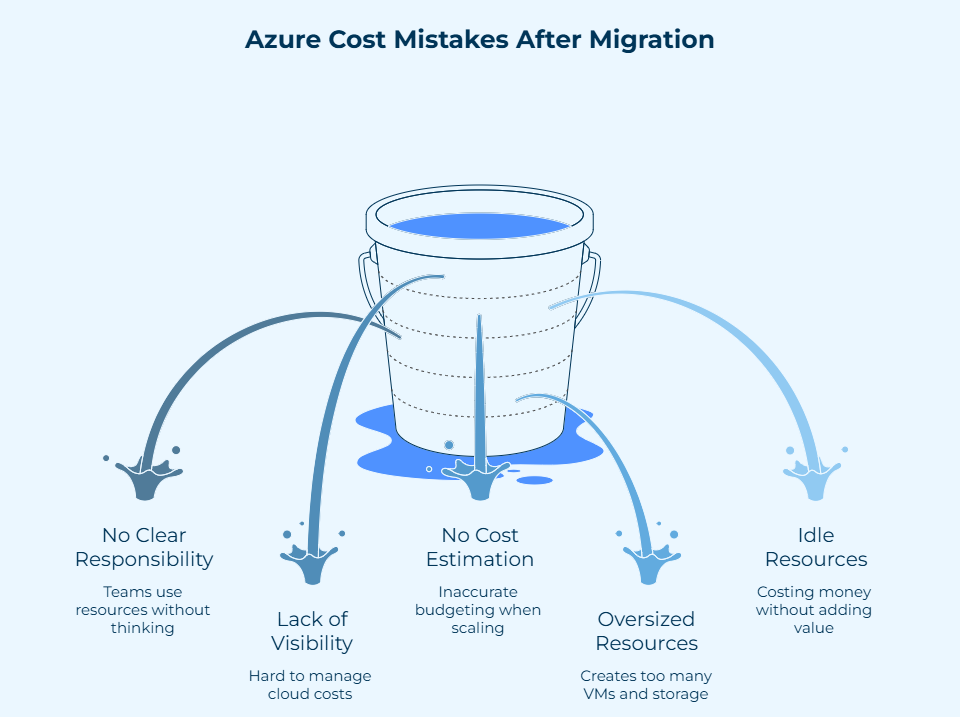
- No clear responsibility for Azure spending: When there is no accountability, teams use resources without thinking, which makes Azure cost control weaker.
- Lack of visibility into total cloud spend: Poor tracking across hybrid or multi-cloud environments makes it hard to manage Azure cloud costs well.
- No cost estimation tools: Without using tools like the Azure pricing calculator before scaling workloads, it can lead to inaccurate budgeting.
- Oversized resources from lift-and-shift migrations: When legacy configurations are moved as they are, they create too many VMs and storage, which makes Azure spend optimization less effective.
- Resources that are idle or not being used: Inactive instances keep costing money without adding any real value to the business.
These mistakes cause cloud waste and emphasize that Azure cost optimization is important after migration.
10 Best Practices for Azure Cost Optimization after Migration
Moving workloads with Azure Migration Services is indeed an achievement, but it doesn’t mean you will save money. Businesses must go for a structured approach that balances performance, scalability, and financial management in order to grasp how to reduce cloud spend after Azure migration.
1. Set up ongoing spending tracking and analysis
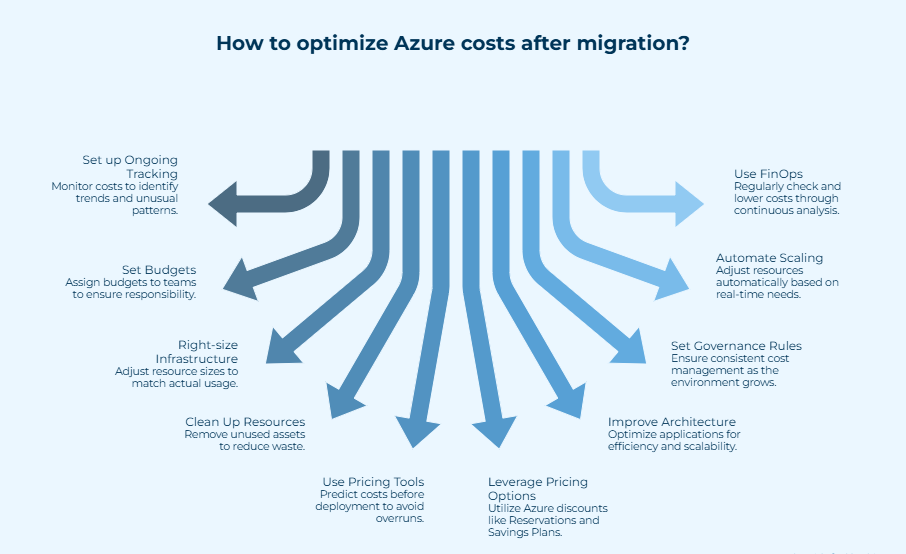
Azure Cost Optimization begins by being able to see all of your costs. Businesses may keep an eye on usage trends, service-level spending, and spot unusual consumption patterns by using Azure cloud cost management. Continuous analysis allows you to make decisions on time, which keeps costs from going up and makes long-term financial predictions more accurate.
2. Set budgets and ensure responsibility for costs.
Costs for the cloud go up quickly if you don’t own it. Giving budgets to departments and teams makes them more responsible with their money and helps in Azure cost optimization. Routine cost alerts and reports keep stakeholders informed about expenditure restrictions. This encourages responsible use and better coordination between technical and financial teams.
3. Position your infrastructure as per needs
Right-sizing your infrastructure is one of the best ways for Azure cost optimization. Many workloads that moved through lift-and-shift models continue to have large setups that were built for your infrastructure environments. Changing the sizes of VMs, database tiers, and storage spaces based on how they are actually used ensures they work effectively and cuts down on wasteful spending. This is one of the most substantial Azure cost optimization techniques.
4. Clean up resources that are not being used
Over time, cloud environments tend to collect useless assets like idle VMs, discs that are not attached, and networking parts that are not being used. Regular cleanup tasks help in Azure cost optimization by getting rid of wasted resources and making things run more smoothly. When done regularly, these actions also show process gaps that affect efficiency in ways other than cost.
5. Use Azure Pricing Tools to make better cost predictions
For long-term Azure cloud cost management, it is very important to make accurate predictions. Companies can use tools like the Azure cost calculator to figure out how much new services will cost before they are put into use. This proactive strategy makes business propositions stronger, budgeting more accurate, and stops unforeseen financial overruns.
6. Get the most savings using Azure’s pricing and licensing options
Azure has a number of ways to get discounts that are meant to save you money over time. Reservations, Savings Plans for Compute, Spot Virtual Machines, and Azure Hybrid Benefit all help lower costs for workloads that are easy to anticipate. Adding these to the Azure cost optimization approach will help you save money with the least amount of impact on your operations.
7. Improve the architecture of applications and workloads
For effective Azure cost optimization, you need to do more than simply fix the infrastructure. Employing the Azure Well-Architected Framework to look at applications can help you find ways to optimize the architecture. You can switch to containers, employ serverless computing, tweak databases, and use hot storage less. Cloud-native designs make things more efficient, faster, and cheaper to scale.
8. Set up rules for governance and costs.
Governance ensures that Azure cost optimization stays the same as environments grow. Using Azure Policy and the Microsoft Cloud Adoption Framework helps businesses keep costs down, ensure resources are used in the same way, and lower financial risks. Governance makes cost optimization a regular part of running a business instead of a one-time job.
9. Automatically adjust scaling to meet real-time needs
Automation is very important for Azure cost optimization since it makes sure that resources only scale up or down when they are needed. Autoscaling and scheduled shutdowns are two features that make Azure cloud cost management stronger by making sure that spending matches workload demands. They also eliminate the need for manual intervention and stop overconsumption.
10. Use FinOps methods to regularly check and lower costs
You can’t opt for Azure cost optimization once; you have to ensure routine checkups. Using FinOps methods lets businesses look at spending patterns, check their optimization efforts, and make their budgets better over time. This continuing method helps keep costs down on Azure and fosters long-term spending optimization as cloud environments change.
To save money and improve efficiency in the long run, organizations must use these post-migration Azure cost management tips. Maximize your cloud spending by starting your Azure cost optimization journey today!
Migrate to Azure Without Overspending

How can Bloom help with Azure Cost Optimization after Migration?
After migrating to Azure, it becomes important to keep an eye on cloud prices for efficient service and securing better ROI. Bloom helps organizations in Azure cost optimization by cutting down waste and getting the most out of the cloud.
- Bloom’s Azure cloud cost management helps with the problem of not being able to see costs by letting you keep track of all your Azure spending in one place.
- As part of Azure cost optimization, Bloom helps with budget setting and cost responsibility by sending out alerts and regular spending reports.
- Bloom uses Microsoft Azure’s built-in pricing tools and cost calculators to figure out how much the cloud will cost and help you make smart choices when optimizing Azure costs after migration.
- Bloom helps in Azure cost optimization by making workloads and application architecture better through methods like serverless computing, containers, and database optimization.
- Bloom ensures Azure cost optimization by providing tools for governance, automation, and scaling to make sure your Azure spending matches the actual workload need and cuts down on unwanted increases.
Conclusion
Azure cost optimization is the need of the hour for businesses to turn a successful migration into a sustainable and budget-friendly cloud strategy. Moving workloads and databases to Azure is just the first step. You need to make sure that the resources are of the proper size, architectures are optimized, and regulatory compliance is enforced. This will help you expand cloud services with time and avoid overspending. Your Azure cost optimization checklist should include consumption tracking, budget allocation, cleaning of unused resources, and use of Azure saving options. This makes sure that the money spent helps your business reach its goals and thrive over time.
Are you having trouble with increasing Azure expenses after migration? Talk to our Azure experts to create a personalized cost optimization plan that gives you the most value.
Frequently Asked Questions
1. What is Azure cost optimization?
Azure cost optimization is the continual process of keeping track of, controlling, and lowering your company’s cloud costs on Microsoft Azure. The goal is to get the most out of your cloud investment by making sure that resources are used carefully, waste is kept to a minimum, and expenses are in line with company goals.
2. What is Azure Cost Management?
Azure Cost Management includes a set of FinOps tools that assist businesses in analyzing, observing, and lowering their Microsoft Cloud expenditures. Anyone with a billing account, subscription, resource group, or management group can use it. It can be used through the Azure portal or as a separate tool for FinOps teams. Some of its primary features are cost analysis and reporting, budgets and alerts, recommendations on saving money, cost allocation, and more.
3. How do you optimize Azure resources?
You can use the Azure Cost Optimization workbook in Azure Advisor to get ideas and suggestions on how to make the most of Azure resources. This includes idle resources, deallocated VMs, Reservations, and Savings Plans. You can also use tagging and governance tools like Azure Policy to keep track of expenditures. Make sure everything runs smoothly by employing the proper amount of resources, automating scaling, using spot and reserved instances, cleaning up unused assets, establishing budget alerts, etc.
4.How much does Azure spend a year?
Before implementing, you can use the Azure Pricing Calculator and product-specific pricing websites to figure out how much something will cost. Microsoft doesn’t publicly provide a particular annual spending amount for Azure. But these tools help businesses plan their budgets, make the right choices, and ensure that the installations are budget-friendly. It is very important how businesses control Azure cloud costs after migration.
5. What are the best Microsoft Azure cost analysis and monitoring tools?
Microsoft Cost Management, Azure Advisor, Azure Pricing Calculator, and Azure Resource Manager are some of the best tools for analyzing Microsoft Azure costs. Microsoft Cost Management helps with budgets, cost analysis, reporting, alarms, cost allocation, optimization suggestions, and governance controls. Azure Advisor gives you personalized suggestions for how to make the most of your money. The Pricing Calculator helps you find out how much your anticipated workloads will cost.
6. Does Microsoft cost management support Azure?
Azure is completely supported by Microsoft Cost Management. It is meant to help businesses look at, keep an eye on, and lower their cloud costs across Azure. It keeps track of consumption, analyzes costs, spots unusual charges, predicts costs, sets budgets and alerts, and follows personalized suggestions. You can get these features for free and access them through the Azure portal.
7. What is Azure pricing calculator?
The Microsoft Azure Pricing Calculator is a web-based application that lets people figure out how much Azure services will cost based on how much they plan to use them. It lets businesses plan and budget by letting them set up services, choose areas, and see full cost summaries. The calculator works with all Azure services and can provide negotiated or discounted prices for those who have logged in.
8. How do I manage Azure costs?
You can use Microsoft Cost Management to see your costs, set budgets, get notifications, and suggestions to save money. Use Azure Advisor to gain practical tips on how to save money, and the Azure Pricing Calculator to get accurate estimates before you deploy. Use Reservations and Savings Plans, enable autoscaling. Enforce governance using Azure Policy to minimize costs by right-sizing resources, shutting down unused assets, and more. Ongoing monitoring and assessment make sure that costs are low.
9. How do I get a price quote for Azure?
The Azure Pricing Calculator can provide you with a pricing quote for Azure by estimating costs based on how you plan to use it. You may choose services, set up regions, tiers, and usage levels, and see a full breakdown of costs. You can directly get formal estimates or personalized help from Microsoft. Also, you can contact Azure professionals from reputed companies like Bloom.


Recent Posts
- Azure Cloud Architecture Explained: A Simple Guide for Enterprises
- CI/CD Pipeline Setup in Azure: Best Practices for 2026
- DevOps vs DevSecOps: What’s the Difference?
- Hire Azure DevOps Developers Who Deliver Faster, Secure CI/CD Pipelines
- Azure Virtual Machines vs Containers: What’s Right for Your Infrastructure?