CI/CD Pipeline Setup in Azure: Best Practices for 2026

Today, deploying software involves more than just writing good code. Applications need to be built, tested, and released quickly, but reliability or security can’t be compromised. When deployments depend a lot on manual processes, they can cause delays, inconsistent environments, and production problems.
CI/CD pipeline in Azure helps resolve these issues by moving code from development to production automatically. Before deployment, every modification is automatically built, tested, and verified. This makes the workflow more organized and lowers the chance of errors. This lets teams release updates more quickly while keeping things stable in all environments. But automation by itself isn’t enough. To make sure that pipelines stay dependable, safe, and scalable as applications grow and deployment frequency increases, it’s important to follow Azure DevOps pipeline best practices.
What is a CI/CD Pipeline in Azure?
CI/CD pipeline in Azure is an automated process that creates, tests, and delivers apps in the Azure environment. It helps migrate code changes from development to production in a way that is organized and dependable.
Tools in Azure DevOps, especially Azure Pipelines, boost the pipeline. This cloud-based solution can automatically compile, test, and deploy code in many different contexts.
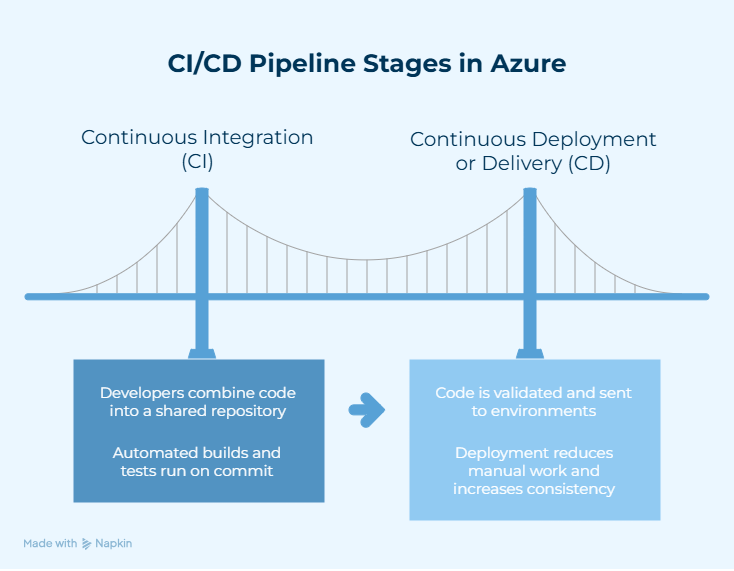
There are two main stages of CI/CD-
1. Continuous Integration (CI)
Developers often combine their code into a shared repository like GitHub or Azure Repos. Automated builds and tests run every time a commit is made to find problems early in the development process.
2. Continuous Deployment or Continuous Delivery (CD)
When code is validated, it is automatically sent to either the staging or production environments. This method cuts down on the need for manual work and makes deployments more consistent.
Following Azure DevOps pipelines best practices is essential for making sure they are stable, secure, and able to grow over time.
What are the Best Practices for Azure CI/CD Pipelines?
Automation alone won’t be enough to make a reliable CI/CD pipeline in Azure. The pipeline needs to be built in a way that it works the same way in both development and deployment environments, is safe, and runs quickly.
Here are some of the best practices that companies should follow to have an effective Azure CI/CD pipeline.
1. Use YAML to Define Pipelines as Code
One of the most important things to do for a CI/CD pipeline in Azure is to define pipelines as code with YAML files. Pipelines that use YAML and are stored in source control make it easier to track versions, be open, and follow standards. This method makes it easier for teams to work together and makes sure that the Azure DevOps pipeline configuration is the same in all situations.
2. Use Automated Testing at the Beginning of the Pipeline
Automated testing is a very important part of keeping quality high in an Azure DevOps CI/CD pipeline. Whenever code changes are made, unit tests, linting checks, and security scans should run automatically. Testing early helps find bugs quickly and stops unstable code from moving further down the CI/CD pipeline in Azure.
3. Build and Release Stages Should Be Separate
A reliable CI/CD pipeline setup keeps the build process and the release stages distinct. The build stage makes artifacts once, and those same artifacts are used in many different places. This method makes an Azure CI/CD pipeline more consistent and less likely to make mistakes during deployment.
4. Keep Secrets and Private Information Safe
From the start, security must be built within the CI/CD pipeline in Azure. You should never keep sensitive data like passwords, API keys, and connection strings in code. Using Azure Key Vault or secure variable groups is a good way to create a secure CI/CD pipeline and keep critical data safe.
5. Use Infrastructure as Code to Keep Environments the Same
Infrastructure as Code (IaC) makes ensuring that the environments in an Azure CI/CD pipeline stay the same throughout its life cycle. Tools like ARM templates and Terraform let you define and deploy infrastructure in code. This makes it less likely that configurations will change and makes it easier to repeat.
6. Use Testing Environments that are Temporary and Separate
Testing in separate settings makes DevOps pipeline automation more reliable. Containers and other temporary environments make sure that every test run takes place in a clean and regulated setting. This eliminates environment-related issues in a CI/CD pipeline in Azure.
7. Make the Pipeline Run Faster and Better
The efficiency of a pipeline has a direct impact on how productive developers are. Parallel jobs, task optimization, and caching systems all help to speed up builds. Faster execution speed makes sure that an Azure DevOps CI/CD pipeline gives you feedback faster and helps you develop software quickly.
8. Put in Place Approvals for Governance and Deployment
Governance controls are necessary to keep a CI/CD pipeline in Azure stable. Role-based access control makes sure that only people who are allowed to change pipeline parameters may do so. Approval gates for production deployments assist lower the hazards of running a business.
9. Monitor Performance and Metrics of the Pipeline
Keeping an eye on things all the time helps keep an Azure CI/CD pipeline running smoothly over time. Tracking things like how long it takes to create, how often deployments happen, and how long it takes to recover can help in finding performance gaps. This also helps in improving the DevOps pipeline automation all the time.
How Does CI/CD Work in Azure DevOps?
When code changes are made, the CI/CD pipeline in Azure takes care of building, testing, and deploying the apps. Azure Pipelines takes care of this automation in Azure DevOps services. Workflows are normally set up using configuration files.
There are two parts to the process. These are Continuous Integration (CI) and Continuous Delivery or Deployment (CD).
| Stage | How It Works |
| Code Commit | Developers push code changes to repositories such as Azure Repos or GitHub. This triggers the CI/CD pipeline in Azure. |
| Pull Request Validation | When a pull request is created, the pipeline runs quick checks such as build verification, static analysis, security scans, and unit tests. |
| Code Review & Merge | After validation checks pass, reviewers approve the changes and merge them into the main branch. |
| CI Pipeline Execution | The Azure DevOps CI/CD pipeline runs a full build and additional tests, including integration testing. |
| Artifact Creation | If the build succeeds, the pipeline generates artifacts such as application packages or container images. |
| Artifact Storage | Build outputs are stored in repositories such as Azure Artifacts or container registries. |
| CD Pipeline Trigger | The release pipeline starts automatically when a new artifact is published. |
| Deployment to Environments | The artifact is deployed to environments such as development or staging using predefined Azure DevOps pipeline configuration. |
| Acceptance Testing | Automated tests validate application behavior in the deployed environment. |
| Approval Gates | Production releases may require manual approval as part of Azure DevOps pipeline best practices. |
| Production Deployment & Monitoring | The application is deployed to production and monitored for performance and reliability. |
This automated routine makes sure that the CI/CD pipeline in Azure sends software updates quickly, consistently, and with fewer mistakes during deployment.
How to Set up a CI/CD pipeline in Azure DevOps?
To set up a CI/CD pipeline in Azure, you need to set up automated workflows that create, test, and deploy apps every time the code changes.
| Steps | Action |
| Prerequisites | Create an Azure DevOps organization and project. Store application code in Azure Repos or GitHub. Configure an Azure service connection for deployments. |
| Create Pipeline | Navigate to Pipelines and select New Pipeline to start the CI/CD pipeline setup. |
| Select Repository | Choose the repository that contains the application source code. |
| Define Pipeline Configuration | Use a YAML template or starter pipeline to define the Azure DevOps pipeline configuration. |
| Configure Build Tasks | Add steps to restore dependencies, compile code, and run automated tests. |
| Enable CI Trigger | Configure automatic builds whenever code changes are committed. This activates the CI/CD pipeline in Azure. |
| Generate Build Artifacts | Successful builds produce artifacts such as application packages or container images. |
| Create Release Pipeline | Configure a deployment pipeline to manage the delivery stage of the Azure CI/CD pipeline. |
| Link Artifacts | Connect the release pipeline to artifacts generated during the CI stage. |
| Configure Deployment Tasks | Add deployment steps for environments such as Azure App Service or Kubernetes. |
| Add Deployment Stages | Create stages like QA, staging, or production following Azure DevOps pipeline best practices. |
| Enable Deployment Trigger | Configure automatic deployments when new artifacts are available. |
| Run and Validate | Run the pipeline once to verify that the Azure DevOps CI/CD pipeline executes correctly. |
With this well-organized Azure DevOps pipeline setup, apps can move from development to production using automated and repeating steps. This method eliminates manual work and makes the software delivery lifecycle more reliable.
How to Automate Deployments Using Azure DevOps?
With Azure DevOps services, teams can set up workflows that automatically build apps and send them to the right places whenever code changes are made.
| Step | What to Do |
| Set Up a Code Repository | Store the application code in Azure Repos or GitHub so the pipeline can access the source files. |
| Create a Service Connection | Link Azure DevOps to the Azure subscription using a service connection with the required permissions. |
| Create the Build Pipeline | In Pipelines, create a new pipeline and define the build process using YAML. This forms the build stage of the CI/CD pipeline in Azure. |
| Add Build Tasks | Configure tasks to compile the application, restore dependencies, run tests, and generate build artifacts. |
| Enable Build Triggers | Configure triggers so the Azure DevOps CI/CD pipeline runs automatically when code changes are pushed to the repository. |
| Publish Build Artifacts | Store the build outputs, such as application packages or container images, for use in deployment stages. |
| Create Deployment Stages | Configure release stages such as development, staging, and production within the Azure CI/CD pipeline. |
| Link Artifacts to Deployment | Connect the deployment stage to the artifacts generated during the build stage. |
| Configure Deployment Tasks | Add tasks to deploy the application to services like Azure App Service or Kubernetes clusters. |
| Enable Continuous Deployment | Configure automatic deployments whenever a new build artifact becomes available. |
| Add Approval Checks | Set manual approval gates for sensitive environments to follow Azure DevOps pipeline best practices. |
| Run and Validate | Commit code to trigger the pipeline and verify that deployment occurs automatically across environments. |
With these steps, deployments become consistent, repeatable, and completely automated across the CI/CD pipeline in Azure.
How to secure a CI/CD pipeline in Azure?
Security is extremely essential in a CI/CD pipeline in Azure because pipelines work with source code, credentials, and deployment environments. Pipelines can leak critical information or let illegal deployments happen if they aren’t properly protected.
| Security Area | Recommended Practice |
| Secret Management | Store passwords, tokens, and keys in Azure Key Vault. Reference them in pipelines instead of hardcoding them in scripts. |
| Identity-Based Access | Use Managed Identities or workload identity federation to authenticate Azure resources without storing credentials in the CI/CD pipeline in Azure. |
| Role-Based Access Control | Restrict permissions using RBAC so only authorized users can modify pipelines or approve deployments. |
| Branch Protection Policies | Enforce pull requests, code reviews, and successful builds before code merges into main branches. This strengthens governance in an Azure DevOps CI/CD pipeline. |
| Secure Pipeline Settings | Disable queue-time variable overrides to prevent users from changing sensitive configuration during manual runs. |
| Task Argument Validation | Enable argument validation for shell tasks to reduce command injection risks in the CI/CD pipeline in Azure. |
| Agent Security | Use Microsoft-hosted agents for isolated builds or deploy self-hosted agents within a restricted network. |
| Security Scanning | Integrate automated scans to identify vulnerabilities in code, dependencies, and infrastructure templates. |
| Infrastructure as Code Security | Use Infrastructure as Code to create consistent environments and apply security policies across the Azure CI/CD pipeline. |
| Audit and Monitoring | Regularly review pipeline permissions and monitor execution logs for unusual activity or potential leaks. |
By using these steps, you can maintain a secure CI/CD pipeline and make sure that deployments are always reliable and under control.
Also Read: Hire Azure DevOps Developers for Secure CI/CD Pipelines
What Tools are used in Azure CI/CD Pipelines?
A CI/CD pipeline in Azure uses several technologies to keep track of source code, builds, deployments, and monitoring. These tools operate together with Azure DevOps services to automate the distribution of software delivery and ensure that the releases are always the same.
| Category | Tools | Role |
| Pipeline Automation | Azure Pipelines | Automates build, test, and deployment processes in a CI/CD pipeline in Azure. |
| Source Control | Azure Repos, GitHub | Stores application code and triggers pipelines on code changes. |
| Artifact Management | Azure Artifacts, Azure Container Registry | Stores build outputs such as packages or container images. |
| Build & Test Tools | Maven, Gradle, NuGet, npm, Docker | Compile code, manage dependencies, and create build packages. |
| Security & Code Quality | SonarCloud, Snyk | Scan code and dependencies for vulnerabilities in the Azure DevOps CI/CD pipeline. |
| Deployment Targets | Azure App Service, Azure Kubernetes Service, Azure Functions, Azure Virtual Machines | Environments where applications are deployed. |
| Infrastructure as Code | Terraform, ARM Templates, Bicep | Automate infrastructure setup for an Azure CI/CD pipeline. |
| Secrets Management | Azure Key Vault | Securely stores credentials and sensitive data used by pipelines. |
| Monitoring | Azure Monitor, Application Insights | Track application performance and deployment health. |
| Third-Party Integration | Jenkins, GitHub Actions, ServiceNow | Extend automation or integrate external workflows. |
These technologies make it possible to automate tasks safely and deploy them reliably within a CI/CD pipeline in Azure.
How Does CI/CD Improve DevOps Workflows?
A well-implemented CI/CD pipeline in Azure helps teams produce software faster while still being reliable and maintaining control.
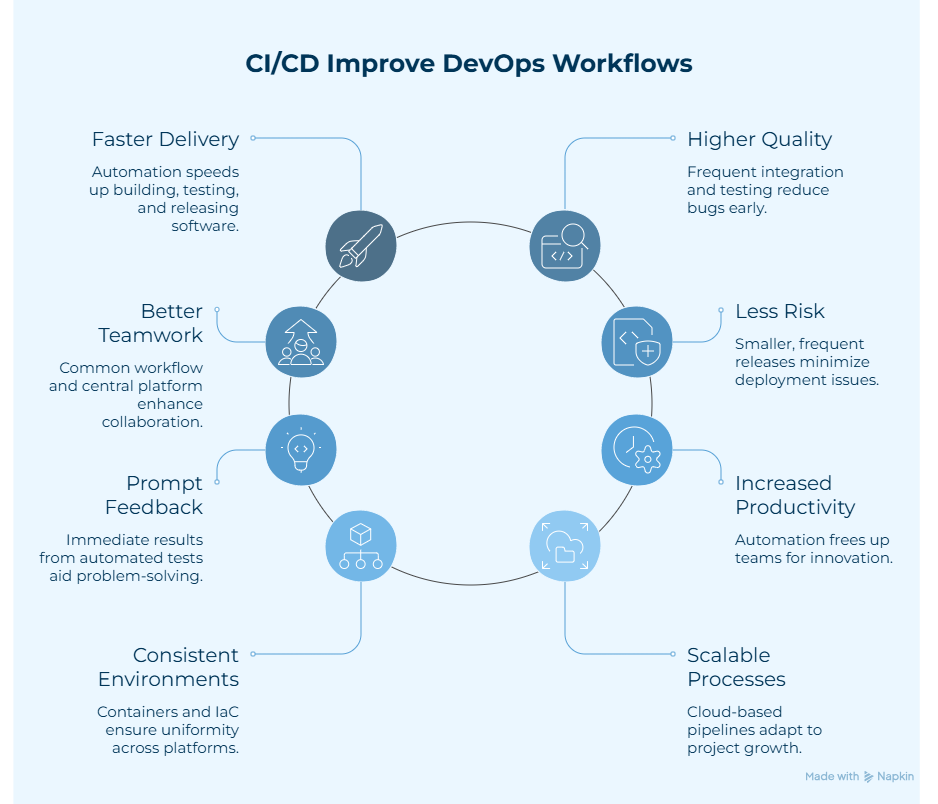
- Faster Software delivery: Automation makes the processes of building, testing, and releasing faster. With an Azure DevOps CI/CD pipeline, you can get new features and fixes faster.
- Higher Quality Code: Frequent integration and automated testing make it easier to find bugs early. This makes the Azure CI/CD process more reliable.
- Better Teamwork: CI/CD gives development and operations teams a common way to work. Azure DevOps services make it possible to build and deploy from one place.
- Less Risk of Deployment: Releasing smaller updates to the code more often makes it less likely that something will go wrong. An Azure CI/CD pipeline also makes it easier to go back to an earlier version if something goes wrong.
- Prompt Feedback: Automated builds and tests provide you with immediate feedback on changes to your code. This helps teams find and fix problems sooner in the development process.
- Increased Productivity: Automation takes care of tasks that need to be done repetitively. This lets teams spend more time on new ideas and development.
- Consistent Environments: Tools like containers and Infrastructure as Code keep things the same across environments. This makes a CI/CD pipeline in Azure more reliable.
- Scalable DevOps Processes: Cloud-based pipelines can readily grow to meet the needs of a project. An Azure DevOps CI/CD pipeline can handle more work without any disruption.
What are the Benefits of CI/CD in Azure?
A CI/CD pipeline in Azure lets businesses automate the delivery of software, make code more reliable, and make deployments easier across different environments.
- Releases That Happen Faster: Automation makes builds, tests, and deployments go faster. This allows teams to release updates more often.
- Works Well with Azure Services: Pipelines work well with services like Azure Functions, Azure App Service, and Azure Kubernetes Service, which makes it easier to deploy applications.
- Better Quality Code: Automated testing checks every change to the code, which helps teams find problems early and keep builds reliable.
- Same Environments : Azure Resource Manager templates and Terraform are two tools that help keep infrastructure the same in development and production.
- Better Security: Secure authentication and regulated access make the whole pipeline safer.
When Should Companies Implement CI/CD Pipelines?
Businesses should consider switching to a CI/CD pipeline in Azure when,
- A New Project Starts: Setting up CI/CD early on sets up automated workflows for building, testing, and deploying right away.
- Manual Deployments Create Problems: If you keep making mistakes, releasing things that don’t work, or having downtime because of manual processes, you need automated pipelines.
- Teams of developers Expand: CI/CD helps keep code quality high and makes changes seamless when more people work on the same codebase.
- Using or Moving to the Cloud: Standardized and automated deployment techniques help businesses move workloads to the cloud.
- Release cycles Take Longer Time: CI/CD speeds up delivery and makes releases more efficient by making sure that product updates get to users faster.
Many companies use Azure DevOps consulting services to help them set up CI/CD and create DevOps workflows that can grow and perform well.
Key Takeaways
- A CI/CD pipeline in Azure automates the building, testing, and deployment of software, which helps teams release software faster and with fewer bugs.
- Azure DevOps technologies, especially Azure Pipelines, help organize workflows that move code from development to production quickly and easily.
- Following Azure DevOps pipeline best practices like automated testing, managing artifacts, and handling secrets safely makes the pipeline more reliable.
- Azure Key Vault, RBAC, and approval gates are all security mechanisms that help keep an Azure DevOps CI/CD pipeline safe.
- When teams get bigger, release cycles slow down, or businesses move apps to the cloud, CI/CD is a must.
Conclusion
A well-designed CI/CD pipeline in Azure helps businesses speed up the delivery of software, make code more reliable, and keep deployments consistent across environments. Teams can automate builds, testing, and releases while keeping security and scalability in mind as applications develop by following best practices for Azure DevOps pipelines. This method allows for faster innovation without putting operational stability at risk.
Are you ready to set up a CI/CD pipeline in Azure that works well? Talk to our experts and start delivering software more quickly, safely, and effectively. Let’s connect!
Frequently Asked Questions
Q.1 Is Azure DevOps Used for CI CD?
Yes, Azure DevOps has tools like Azure Pipelines that help you manage CI/CD pipelines in Azure and make builds, tests, and deployments run more smoothly.
Q.2 How to Configure CI CD Pipeline in Azure?
To set up a CI/CD pipeline in Azure, you need to make a new pipeline in Azure DevOps, link it to your source code repository, and use YAML or the traditional editor to set up build and deployment activities.
Q.3 What are the 5 Pillars of Azure DevOps?
Reliability, cost optimization, operational excellence, performance efficiency, and security are the five pillars that guide best practices for any CI/CD pipeline in Azure.
Q.4 Is AI Replacing DevOps?
No. In fact, AI is upgrading DevOps by automating tasks that are done repetitively, including setting up CI/CD and testing. However, skilled engineers are still needed for strategy planning and high-level tasks.
Q.5 Is Azure DevOps CI CD Free?
Yes, Visual Studio subscriptions come with Azure DevOps, which gives customers free access to pipelines. Each business can have more than one free user.
Q.6 What is CI CD Pipeline Setup?
A CI/CD pipeline system is a set of automated steps that build, test, and deploy software. It helps teams provide updates more quickly and reliably throughout the development process.
Q.7 Is DevOps a Job or a Culture?
DevOps is definitely a culture, not a job. It focuses on getting development and operational teams to work together so that software can be delivered safely, quickly, and continuously.
Q.8 What are the 5 Components of Azure DevOps?
Azure Boards, Azure Repos, Azure Pipelines (for setting up a CI/CD pipeline), Azure Test Plans, and Azure Artifacts are the five parts that handle planning, coding, testing, and deployment.
Table of Contents
Schedule A Free Call Now !
Fill Out the Form and Our Experts Will Contact You Within 24 Hrs
Recent Posts
- Cloud Management Tools Compared: AWS vs Azure vs GCP for CIOs
- AWS DevOps vs Azure DevOps — Which is Better for Enterprise CI/CD?
- Why Your AWS Bill Increased After Migration (And How to Fix It Fast)
- Best AWS Cloud Management Tools to Simplify Cloud Operations
- AWS Consulting Partner vs In-House Cloud Teams: What Businesses Should Consider