Stop Paying for Logs You Don’t Use: The SaaS Guide to Smarter Azure Monitoring Services
Are you paying for thousands of logs every day without even knowing if they really help? Every second, modern cloud environments create a huge amount of operational data. A log is made for every request, deployment, login, error, or system activity. This helps monitor performance and fix problems, but not all of them will be useful in the long run. Most businesses store and analyze a lot more logs than they actually use. Over time, this gradually raises the cost of monitoring. This is where well-planned Azure monitoring services make a difference. With the right steps, you can maintain your system’s visibility while keeping logging costs under control.
What are Azure Monitoring Services?
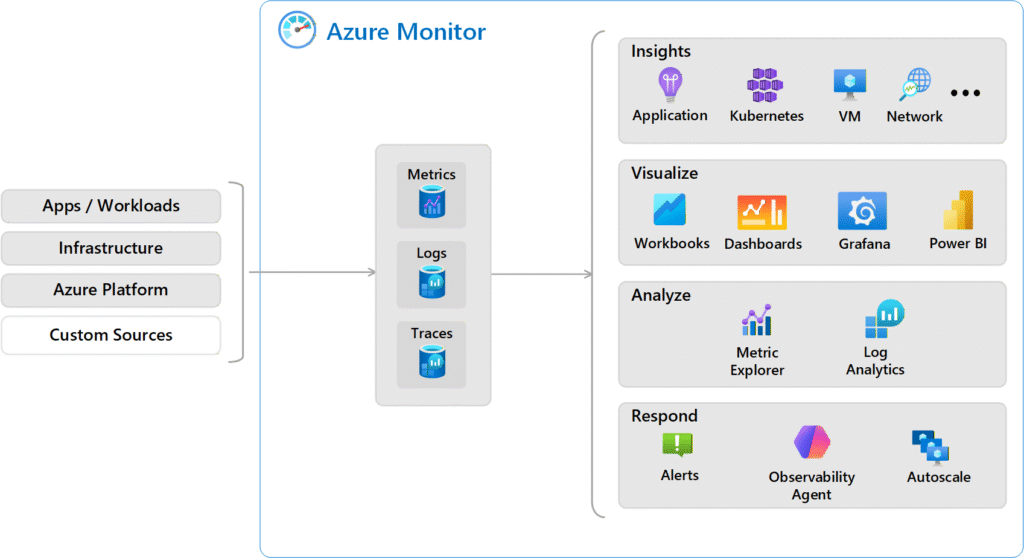
Azure monitoring services are a set of Microsoft Azure tools that collect, analyze, and act on telemetry data from applications, infrastructure, and services. These features help businesses spot problems early, keep systems running, improve performance, and monitor how the system is used and its security. Azure Monitor is what makes this ecosystem work. It brings together metrics, alerts, and Azure log analytics so that teams can quickly understand how the system is working and fix problems.
What are the Types of Logs in Azure?
Before you can make Azure monitoring services more cost-effective, you need to know about the different types of logs that Microsoft Azure creates. Each type of log gives you a different level of visibility into applications, resources, and infrastructure.
| Log Type | What It Tracks | Why It Matters |
| Activity Logs | Records actions performed on Azure resources such as resource creation, deletion, configuration changes, and deployments. | Useful for auditing, governance, and understanding who made changes in the environment. |
| Resource Logs | Diagnostic data generated by Azure services like databases, storage accounts, firewalls, and networking components. | Helps investigate service-level issues and understand how specific resources are behaving. |
| Application Logs | Data generated by applications, including exceptions, response times, dependency calls, and failed requests. Supports Azure application monitoring. | Essential for troubleshooting bugs, improving performance, and understanding user-impacting issues. |
| Infrastructure Logs | Operational data from virtual machines, containers, and networks, such as CPU usage, disk activity, node failures, and container crashes. Helps with Azure infrastructure monitoring. | Helps maintain system health and reliability, especially in large-scale SaaS environments where infrastructure generates high volumes of logs. |
Together, these logs make it possible to see everything, which helps Azure monitoring services keep an eye on apps, resources, and infrastructure in a smart way.
Is Azure Activity Logs Free?
Yes, Azure Activity Logs are free by default. This is a common question businesses ask while planning Azure cost optimization. Activity Logs are free and automatically available for all Microsoft Azure subscriptions. They show who did what, when, and where. You can see them right in the Azure portal without having to pay.
However, costs may come up in some situations,
- Exporting logs to Log Analytics workspaces lets you do more in-depth Azure log analytics.
- Sending logs to services that handle integrations or events in real time.
- Keeping logs for a longer time than the default availability.
- Running complex queries and analytics on a lot of log data.
Understanding how these logs are used in your Azure monitoring services setup can help you keep an eye on your system while keeping costs down.
Why is Azure Log Ingestion So Expensive?
Log ingestion is the process of sending telemetry data to Azure Monitor and Log Analytics.
Two main things affect the price of Azure:
- The size of the data being taken in.
- How long the data is kept.
For SaaS platforms that grow quickly, ingestion gets expensive for a number of reasons.
1. High-Volume Apps
Cloud apps today keep making logs all the time. Telemetry is made by microservices, containers, APIs, and integrations.
2. Debugging Logs in Production
A lot of systems run with verbose logging levels turned on by mistake. This can make the amount of data collected grow.
3. Duplicate Telemetry
Sometimes, more than one monitoring tool collects the same logs.
4. Policies for Long-Term Storage
Keeping logs for months without a clear reason makes storage costs go up.
In most cases, companies don’t always pay for insights. They end up paying for data that isn’t being used. A well-thought-out plan for Azure monitoring services makes sure that only useful logs are collected, stored, and analyzed.
What is the Difference Between Azure Monitor and Log Analytics?
For effective SaaS cloud monitoring, you need to know how Azure Monitor and Log Analytics work together in Microsoft Azure. They are closely related, but they each have a different job to do in Azure monitoring services.
| Aspect | Aspect Azure Monitor Log Analytics | Log Analytics |
| What it is | A centralized monitoring platform for Azure environments | A tool used to analyze and query log data |
| Type of data handled | Collects metrics, logs, alerts, and telemetry | Works mainly with log data |
| Main purpose | Provides visibility into system health and performance | Helps investigate issues using detailed log analysis |
| Query capability | Basic dashboards, alerts, and insights | Advanced queries using Kusto Query Language (KQL) |
| How teams use it | To track overall system behavior and receive alerts | To dig deeper into problems and identify root causes |
To put it simply, Azure Monitor gathers and organizes data for monitoring. Log Analytics helps teams look into problems and explore the data. Together, they form the main parts of Azure monitoring services that SaaS platforms use.
How Can You Reduce Costs Related to Azure Monitor Logs?
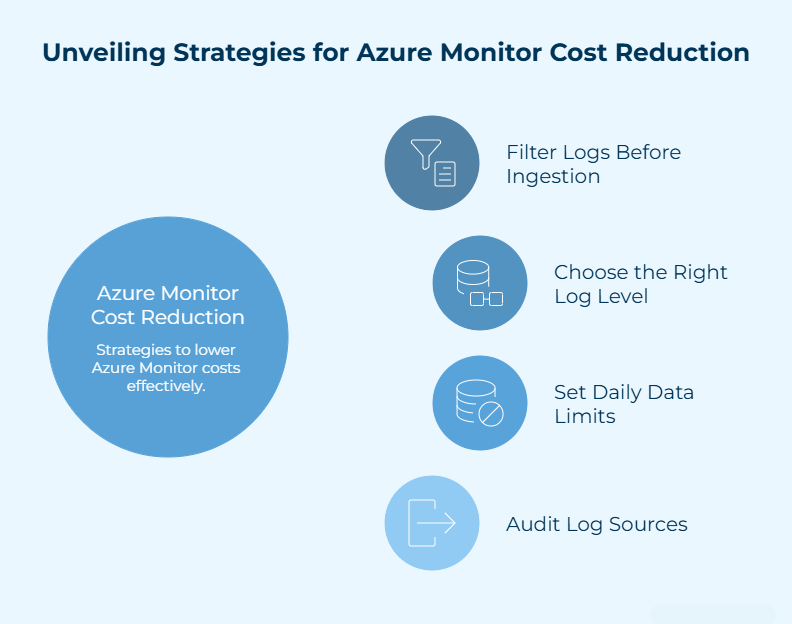
To keep log costs down, you need to use Azure monitoring services in a smarter way instead of just gathering more data. The goal is to improve overall Azure cost optimization while still maintaining useful visibility.
1. Before Ingestion, Filter Logs
Not all logs need to go into Azure Log Analytics. Removing debug logs, duplicate telemetry, and data fields that aren’t very useful lowers the amount of data that needs to be ingested and the overall cost of monitoring.
2. Choose the Right Log Level
Azure has different types of logs for different needs, such as Analytics, Basic, and Archive logs. Keeping important data in analytics logs and moving less-used data to lower tiers helps keep costs down.
3. Set Limits on the Amount of Data You Can Daily
Daily limits in Azure monitoring services stop log ingestion from suddenly rising because of deployments, configuration errors, or traffic spikes.
4. Check the Sources of Your Logs Often
Auditing logging configurations helps get rid of old resources, duplicate integrations, and unnecessary telemetry. This makes SaaS cloud monitoring better while keeping costs down.
How Long Should Logs Be Retained in Azure?
The cost of monitoring is directly affected by log retention. A lot of businesses keep logs for months or even years without a clear reason for doing so. A better way to do things is to make sure that your retention policies match how you actually use them.
Many SaaS teams use the following simple rule when they plan Azure Log Management:
| What the logs are mainly used for | Rough retention many teams follow |
| Troubleshooting application issues and recent incidents | Around 1–2 weeks is usually enough for investigation and debugging. |
| Security monitoring and internal reviews | Often kept for about 1–3 months so teams can track unusual activity if needed. |
| Compliance, audits, or historical reference | Typically stored for a year or longer, depending on policies. |
After this period, logs that aren’t used very often can be moved to cheaper archive storage. This keeps data available when needed, while also making Azure monitoring services more efficient and cost-effective.
How Do You Avoid Paying for Unused Logs in Azure?
Paying for unused logs creates pressure on the finances of companies. This is why Azure monitoring services are needed to democratize the system while also controlling the collection of unnecessary data.
1. Set Clear Levels for Logging
When to use info, warning, error, and debug logs should be clear in the apps. Debug logs should only run for a short time because logging too much data all the time costs more and takes up more space.
2. Keep an Eye on Trends in Log Ingestion
Keeping an eye on ingestion on a regular basis can help you find sudden spikes that are caused by services that aren’t set up correctly, integrations that don’t work, or too much debugging.
3. Transform Data Before Storing It
Filtering and shaping data before ingestion helps get rid of unnecessary fields, group together similar events, and lower the total amount of data.
4. Set Up Monitoring Governance
Policies should make it clear what data gets logged, how long it stays there, and who can change the monitoring settings. This keeps Azure monitoring services running smoothly and under control.
How Can SaaS Companies Optimize Azure Monitoring?
SaaS platforms operate at scale, so even minute problems with monitoring can add up to higher costs over time. A focused approach to Azure monitoring services helps monitor the system while keeping data collection in check.
1. Design Monitoring on Purpose
Instead of allowing everything by default, monitoring should be set up with clear goals. Structured logging, selective telemetry, and prioritized alerts all help make sure that only useful operational data is gathered.
2. Keep an Eye on Costs
Regularly check how monitoring is being used. A lot of teams keep track of how much data they take in each day, figure out which services create the most logs, and look over their monitoring-related spending. This helps keep Azure costs low as environments grow.
3. Use Managed Monitoring Help
As cloud environments grow, it gets harder to manage monitoring setups from within. Many companies depend on Azure Managed Services experts to set up monitoring frameworks, enforce policies, and make sure that monitoring environments stay efficient over time.
How do I Control Azure Observability Costs?
To keep an eye on costs, you need to use Azure monitoring services in a disciplined way and have a better understanding of how data is gathered and stored.
1. Only Collect Data that is Needed
Don’t log too much; instead, focus on useful telemetry that helps with operations and fixing problems. This makes it easier to manage Azure logs as a whole.
2. Make Log Ingestion Better
To lower the cost of Azure log analytics, look over the data that goes into analytics systems and get rid of any unnecessary fields or duplicate entries.
3. Use the Right Retention Policies
For an effective Azure cost optimization, keep operational logs for shorter periods of time and move older data to archive storage.
4. Check on Usage Often
Keep an eye on ingestion trends and find services in your monitoring environment that are sending too much telemetry.
5. Use the Right Range for Monitoring
Instead of gathering every possible log or metric, use Azure application monitoring and Azure infrastructure monitoring that are specific to your needs.
What are Azure Monitoring Best Practices for SaaS?
Monitoring must stay useful for growing SaaS environments without getting too expensive or hard to use. Effective Azure monitoring services focus on getting useful data while making sure that systems stay easy to manage.
1. Log With a Goal
There should be a clear reason for every log. It could be to fix problems, keep an eye on performance, or help with security analysis. Logging with a purpose makes Azure log management better and stops collecting data that isn’t needed.
2. Make Logs Searchable but Keep Them Under Control
You don’t have to send all of your data to analytics systems. Sending only useful telemetry to Azure Log Analytics helps keep an eye on things while lowering the cost of monitoring.
3. Keep Operational Logs and Archival Logs Separate
Logs that are used for active troubleshooting should still be easy to find, but older data can be moved to cheaper storage. This method helps to better optimize Azure costs.
4. Regularly Check the Settings for Audit Monitoring
Systems change a lot, but the settings for logging don’t change very often. Regular reviews help get rid of sources that aren’t being used and keep Azure monitoring services running smoothly.
5. Ensure that Monitoring is in Line with Business Risk
It is important to keep a closer eye on critical services, but less sensitive systems can get by with less logging. This makes sure that resources are used in the most important places.
Following these Azure monitoring best practices helps SaaS platforms stay reliable, visible, and keep their cloud costs down.
Key Takeaways
- A lot of businesses deal with unnecessary spending because they collect a lot of logs but don’t use them very often.
- Well-planned Azure monitoring services focus on useful insights instead of keeping too much telemetry.
- The number of logs ingested and how long they are kept are the main factors that affect monitoring costs.
- Getting rid of additional data makes Azure log management better and costs less for analytics.
- For efficient SaaS cloud monitoring, you need to conduct both Azure application monitoring and Azure infrastructure monitoring.
- Regular checks make sure that Azure monitoring services work well and that you don’t pay for logs you don’t use.
Conclusion
Cloud monitoring should ensure better visibility into your costs, rather than letting expenses go unchecked. When logging strategies are well thought out, organizations gain clarity while keeping operational costs under control. A remarkable aspect of Azure monitoring services is not how much data they collect, but how well they do it. Monitoring becomes effective when companies improve Azure log management, control ingestion, and set reasonable retention policies. With the guidance of Bloom Consulting Services, you can get the most out of your monitoring and only pay for the data that matters.
Frequently Asked Questions
Q1. What are the Azure Services for Monitoring?
Azure Monitor powers the Azure monitoring services. It collects, analyzes, and acts on telemetry from Azure, hybrid, and on-premises systems, and works with tools like Application Insights and Log Analytics.
Q2. What does an Azure Monitor Include?
It works with PaaS, SaaS, and IaaS, and also includes virtual machines, storage, networking, analytics, and application performance monitoring.
Q3. What is the Azure Monitoring Agent Used For?
The Azure Monitor Agent gets telemetry from Azure and hybrid VMs and sends it to Azure monitoring services. These services then use the data to send alerts, give insights, and work with tools like Microsoft Defender and Sentinel.
Q4. Which Azure Service is Used for Monitoring and Diagnostics?
With Azure Monitor, you can use diagnostic settings to collect resource logs and platform metrics and send them to Log Analytics, storage, or event hubs for reporting and analysis.
Q5. What are the 5 Pillars of Azure?
There are five pillars, ranked by workload priorities: reliability, cost optimization, operational excellence, performance efficiency, and security.
Q6. What are Logs in Azure?
Azure logs keep track of events and actions that happen with your resources. The activity log keeps track of important control-plane actions, such as when a resource is created, changed, or has a deployment error.
Q7. What is Microsoft Azure Log Analytics?
You can use Azure Log Analytics to search, analyze, and show data that Azure monitoring services have collected. It keeps an eye on performance and fixes problems with workloads using Kusto Query Language (KQL).
Q8. What is the Difference Between Azure Monitor Logs and Logs Analytics?
Azure Monitor Logs can handle simple queries for resource data. Log Analytics workspaces, on the other hand, let you do more advanced analysis with KQL, which supports aggregations, joins, and detailed insights.
Table of Contents
Schedule A Free Call Now !
Fill Out the Form and Our Experts Will Contact You Within 24 Hrs
Recent Posts
- Why Your AWS Bill Increased After Migration (And How to Fix It Fast)
- Best AWS Cloud Management Tools to Simplify Cloud Operations
- AWS Consulting Partner vs In-House Cloud Teams: What Businesses Should Consider
- AWS Migration Checklist: What Businesses Should Prepare Before Migrating Applications
- Key DevOps Best Practices for Applications Running on AWS